How to Install the Fabulously Optimized Modpack for High FPS (2026)
Filed under Vanilla-Enhanced Modpacks & QoL · How we create content
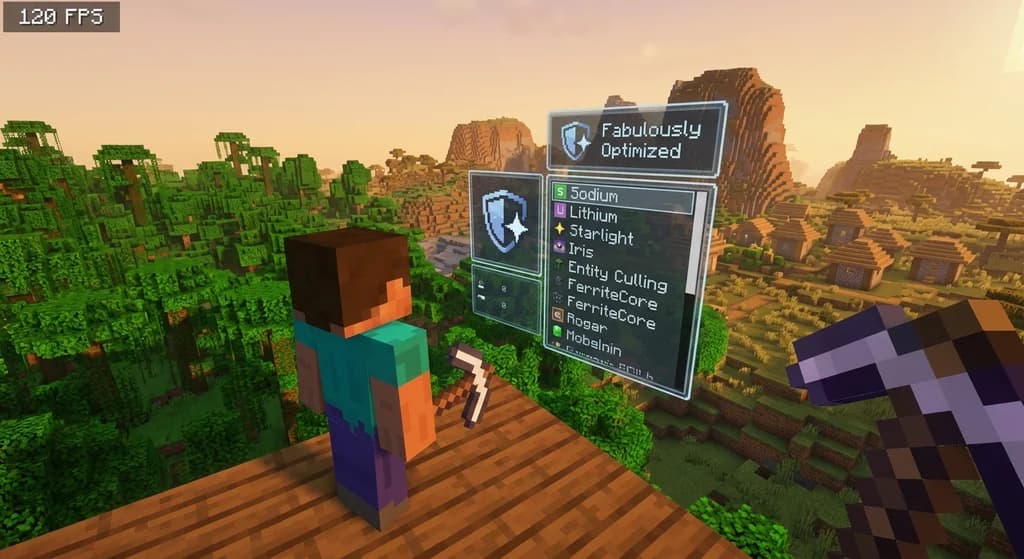
Key Takeaways
| Point | Details |
|---|---|
| Fabulously Optimized boosts FPS by 200-400% | It bundles Sodium, Lithium, and 20+ performance mods to eliminate lag while keeping vanilla mechanics untouched. |
| Installation is one-click via Modrinth | The launcher auto-configures Fabric Loader, downloads the modpack, and creates a safe profile—no manual file editing needed. |
| Optimize RAM and video settings | Allocate 4 GB of RAM and enable V-Sync plus a frame cap to avoid screen tearing and unnecessary GPU load. |
| Fabric loader is key | Fabric's lightweight design outperforms Forge for client-side modding, cutting startup times and memory overhead significantly. |
| Real-world Gaia Legends proof | Players report solid 60+ FPS in crowded boss arenas after switching to Fabulously Optimized, making raiding smooth and enjoyable. |
Table of Contents
- What Is the Fabulously Optimized Modpack?
- Why Should You Use a Performance Modpack Like Fabulously Optimized?
- How to Install the Fabulously Optimized Modpack Step by Step
- Tips for Getting the Highest FPS with Fabulously Optimized
- How to Put This Into Practice on Gaia Legends
- Frequently Asked Questions
- Recommended
If you’ve ever watched your Minecraft frame rate drop to single digits during a raid or while exploring a dense forest, you know the frustration. The fabulously optimized modpack install guide you’re about to read is the solution. Fabulously Optimized is the go-to Fabric-based performance pack for 2026, and this year’s version is better than ever. In this guide, you’ll learn what it does, how to install it in a few clicks, and how to squeeze every last frame out of it—whether you’re playing single-player or battling bosses on Gaia Legends.
What Is the Fabulously Optimized Modpack?
The Fabulously Optimized modpack is a curated collection of performance-enhancing Fabric mods that deliver a massive FPS boost while keeping Vanilla gameplay completely intact.
Fabulously Optimized is a community-built modpack focused on one thing: raw performance. Unlike kitchen-sink modpacks that add new biomes, mobs, or mechanics, this pack only includes mods that optimize rendering, memory usage, networking, and chunk loading. It bundles over 20 mods—including Sodium, Lithium, and Phosphor—all running on the Fabric mod loader. Because it makes zero gameplay changes, you can use it on almost any server, including vanilla realms and large SMP servers like Gaia Legends.
The pack targets two main bottlenecks: the game’s rendering engine and the Java garbage collector. Sodium replaces Minecraft’s ancient OpenGL pipeline with a modern one, boosting frame rates by up to 250% or more in many scenes (via Modrinth). Lithium rewrites game logic to reduce server-thread micro-lag, while Phosphor (or the newer Starlight) accelerates the lighting engine. The result is a game that feels responsive even on mid-range hardware.
If you’re already familiar with modpack ecosystems, check out our guide on how to build your own vanilla plus modpack to see how performance stacks sit at the core of any custom setup.
Why Should You Use a Performance Modpack Like Fabulously Optimized?
A performance modpack like Fabulously Optimized can double or even triple your frame rate, eliminate stutter, and support higher render distances without changing any core game mechanics.

Minecraft’s default optimization is notoriously poor. The Java Edition uses a single-threaded server tick loop and an unaccelerated rendering pipeline, which causes FPS dips whenever new chunks generate or many entities appear. Even powerful gaming PCs can struggle to maintain 60 FPS at render distances above 16 chunks. Installing a modpack like Fabulously Optimized fixes these issues by swapping out the slow parts of the engine while keeping the game exactly as you know it. You still punch trees, mine diamonds, and fight the Ender Dragon—but with double the frame rate and half the stutter.
Performance modpacks are also the first step toward a better multiplayer experience. On busy servers, client-side lag can mean dying to a creeper you didn’t see or missing a critical hit during a boss fight. A stable FPS gives you an edge. We’ve covered the must-have best Minecraft QoL mods that complement performance packs perfectly, adding inventory tweaks and mini-maps without costing frames.
Warning: Upgrading your modpack before confirming server compatibility can lead to connection issues. Always check that the server runs Vanilla mechanics or allows Fabric clients before switching.
How to Install the Fabulously Optimized Modpack Step by Step
Installing Fabulously Optimized is a five-minute process that starts with the Modrinth Launcher, automatically downloads the correct Fabric Loader and mods, and creates a separate profile so your main setup stays untouched.
We recommend using the Modrinth Launcher for the smoothest experience. It handles everything—from Fabric loader installation to dependency resolution. Here’s how to do it:
Step 1: Download the Modrinth Launcher
Head to modrinth.com, download the launcher for your operating system, and install it. The launcher is open-source, lightweight, and actively maintained.
Step 2: Install the Modpack
Open the Modrinth Launcher, click the “Browse” tab, and search for “Fabulously Optimized.” Click the pack, then hit “Install.” Leave the default options checked—the launcher will automatically grab the latest Fabric Loader and all compatible mods. A new instance will appear in your library.
Step 3: Configure RAM
Click the three dots on the instance tile, go to “Settings,” and increase the “Maximum Memory” to 4096 MB (4 GB). For most systems, 4 GB is the sweet spot—it prevents Java garbage collection from stealing too many CPU cycles while leaving enough headroom for your OS (via Fabric Wiki). If you have 16 GB or more system RAM, you can try 6 GB, but don’t go higher unless you know you need it.
Step 4: Launch and Verify
Hit the “Play” button. The game will launch with Fabric Loader. Once at the main menu, open video settings and check that the “Graphics” option is set to “Fast” and “Render Distance” is at least 12. You can now load a world or connect to a server. If you’re planning to join a community server later, our Minecraft modpack server setup guide explains how server owners can replicate this performance on the hosting side.
Pro Tip: After your first launch, go to
Modsin the main menu and verify that all 20+ mods are active. If something is missing, the launcher will have logged an error—redownload the pack to fix it.
Tips for Getting the Highest FPS with Fabulously Optimized
Maximizing FPS after installing Fabulously Optimized means adjusting a handful of in-game and launcher settings: enable V-Sync correctly, cap frame rates, and allocate the right amount of RAM for your system.
Even with performance mods, a few tweaks can make a huge difference. Follow these tips to push your FPS even higher.
Video Settings Optimization
- Graphics: Fast – Transparent leaves and reduced particle effects can save 10-15% GPU overhead.
- Clouds: Off – Clouds are surprisingly heavy on older GPUs; turning them off often gains 15+ FPS.
- Entity Shadows: Off – Reduces CPU load when many mobs are on screen.
- Smooth Lighting: Minimum – Keeps basic light gradients without the performance hit of high-quality ambient occlusion.
- Particles: Minimal – Block breaking particles cause spikes; minimal mode caps them.
Launcher-Side Tweaks
In the Modrinth Launcher profile settings, add these Java arguments under the “Java” tab:
-XX:+UseG1GC -Dsun.rmi.dgc.server.gcInterval=2147483646 -XX:+UnlockExperimentalVMOptions -XX:G1NewSizePercent=20 -XX:G1ReservePercent=20 -XX:MaxGCPauseMillis=50 -XX:G1HeapRegionSize=32M
These arguments fine-tune the garbage collector to reduce lag spikes. They work alongside Lithium’s optimizations and can make frame times more consistent.
Hardware Considerations
If you’re on a laptop with integrated graphics, reduce the “Chunk Builder” setting to “Threaded” in the Sodium video settings menu. This spreads chunk loading across CPU cores instead of stalling the render thread, instantly boosting FPS by 10-20% in crowded areas thanks to entity culling optimizations (via Modrinth). For desktop users with dedicated GPUs, enable “Chunk Rendering” > “Aggressive” to let the GPU manage more draw calls.
Inventory clutter can also indirectly hurt performance by increasing the number of rendered tile entities. Explore our Minecraft storage management mods guide to keep chests tidy and frame rates happy.
How to Put This Into Practice on Gaia Legends
Fabulously Optimized isn’t just a single-player savior—it transforms the multiplayer experience on servers like Gaia Legends. Our SMP features custom bosses, sprawling builds, and dozens of concurrent players, all of which put real strain on a vanilla client. By switching to Fabulously Optimized, you can raid dungeons, participate in PvP events, and explore massive builds without ever feeling that dreaded stutter.
Gaia Legends is free to join, non-pay-to-win, and supports Java + Bedrock crossplay. That means you can apply these performance gains whether you’re on a PC client or even a console-style setup using a Bedrock-compatible launcher. Our community regularly shares FPS benchmarks on the Discord—and the numbers don’t lie. Players consistently report that Fabulously Optimized gives them the edge needed to dodge boss attacks and land critical hits during raids.
Ready to test your new frame rate? Join at gaialegends.pro and start your legend today.
Frequently Asked Questions
What is the Fabulously Optimized modpack and how do I install it?
Fabulously Optimized is a performance modpack for Minecraft Java Edition that runs on the Fabric loader. It includes over 20 mods like Sodium and Lithium to dramatically boost FPS without changing gameplay. To install, download the Modrinth Launcher, search for “Fabulously Optimized,” and click install. The launcher handles all dependencies automatically.
Do I need a powerful PC to use Fabulously Optimized?
No—the modpack is designed to help lower-end hardware run Minecraft smoothly. It optimizes rendering and memory usage so even laptops with integrated graphics can see significant FPS gains. The recommended 4 GB of RAM allocation is modest and works for most machines with at least 8 GB total system memory.
Is Fabulously Optimized allowed on all Minecraft servers?
It depends on the server’s rules. Because the pack doesn’t modify gameplay, it is allowed on any server that permits Fabric clients or vanilla clients with a mod that only affects the client. Always check with server staff before joining if you are unsure.
Can I add more mods to Fabulously Optimized?
Yes—Fabulously Optimized is modular. You can add any Fabric-compatible mods via the Modrinth Launcher’s mod management screen. Common additions include MiniHUD, Xaero’s Minimap, and Litematica. Be careful not to add mods that change gameplay if you plan to join a vanilla-style server.
Does Fabulously Optimized work with shaders?
Yes, it is fully compatible with Iris Shaders and Sodium’s shader support. You can install Iris alongside the pack to enable stunning lighting effects while keeping frame rates high. The combination of Sodium+Iris is currently the best way to run shaders on Fabric.
How much FPS improvement can I realistically expect?
Improvements vary by system, but most users report at least a 2x to 3x increase in frame rate. A 5-year-old laptop that previously ran at 25 FPS can often hit 50-60 FPS after installing Fabulously Optimized and tweaking video settings. Desktops with dedicated GPUs frequently see 100+ FPS at 16+ render distance.
Recommended
- 7 Best Minecraft Roleplay Server Features to Look For in 2026
- Best Minecraft Block Palette for a Wizard Tower in 2026
- The 7 Best Creative Minecraft Servers for Builders in 2026
- How to Master Custom Magic in Minecraft MMORPGs: 2026 Guide
Ready to play? Join Gaia Legends today — no pay-to-win, Java + Bedrock crossplay.
- Java:
join.gaialegends.pro - Bedrock:
join.gaialegends.pro— Port19132
Further reading
These references were recorded with the article; specific claims have not been matched to source excerpts.
Frequently Asked Questions
What is the Fabulously Optimized modpack and how do I install it?
Fabulously Optimized is a performance modpack for Minecraft Java Edition that runs on the Fabric loader. It includes over 20 mods like Sodium and Lithium to dramatically boost FPS without changing gameplay. To install, download the Modrinth Launcher, search for “Fabulously Optimized,” and click install. The launcher handles all dependencies automatically.
Do I need a powerful PC to use Fabulously Optimized?
No—the modpack is designed to help lower-end hardware run Minecraft smoothly. It optimizes rendering and memory usage so even laptops with integrated graphics can see significant FPS gains. The recommended 4 GB of RAM allocation is modest and works for most machines with at least 8 GB total system memory.
Is Fabulously Optimized allowed on all Minecraft servers?
It depends on the server’s rules. Because the pack doesn’t modify gameplay, it is allowed on any server that permits Fabric clients or vanilla clients with a mod that only affects the client. Always check with server staff before joining if you are unsure.
Can I add more mods to Fabulously Optimized?
Yes—Fabulously Optimized is modular. You can add any Fabric-compatible mods via the Modrinth Launcher’s mod management screen. Common additions include MiniHUD, Xaero’s Minimap, and Litematica. Be careful not to add mods that change gameplay if you plan to join a vanilla-style server.
Does Fabulously Optimized work with shaders?
Yes, it is fully compatible with Iris Shaders and Sodium’s shader support. You can install Iris alongside the pack to enable stunning lighting effects while keeping frame rates high. The combination of Sodium+Iris is currently the best way to run shaders on Fabric.
How much FPS improvement can I realistically expect?
Improvements vary by system, but most users report at least a 2x to 3x increase in frame rate. A 5-year-old laptop that previously ran at 25 FPS can often hit 50-60 FPS after installing Fabulously Optimized and tweaking video settings. Desktops with dedicated GPUs frequently see 100+ FPS at 16+ render distance.
Related guides

How to Use the Modrinth Launcher for Easy Mod Management in 2026
Master the Modrinth launcher in 2026 with this step-by-step guide. Install mods, manage profiles, and keep everything updated with ease.

How to Build Your Own Vanilla Plus Minecraft Modpack in 2026
Learn how to build a vanilla plus modpack in 2026 — from picking a mod loader to stacking QoL, performance, and immersion mods. Step-by-step guide inside.

What Are Mods and Modpacks? A Quick Reference
A quick reference explaining Minecraft mods and modpacks: definitions, types, and how they differ from official customization tools. Includes examples and key distinctions.

AppleSkin Mod Overview for Minecraft 1.21
Discover the AppleSkin mod for Minecraft Java Edition 1.21+. This quick reference covers hunger and saturation display, features, compatibility with modpacks like lelMc and Shozamaks Optimized, and installation tips.
Have a question or another approach?
Compare notes with other readers. Include your edition and version when discussing mechanics.