How to Solve Minecraft Storage Problems with Vanilla Plus Mods
Filed under Vanilla-Enhanced Modpacks & QoL · How we create content
Key Takeaways
| Point | Details |
|---|---|
| Sophisticated Storage is the top pick | It adds upgradeable chests with filter, sort, and auto-deposit modules that work without any external power source. |
| Iron Chests is the lightest option | Swap vanilla chests for iron, gold, or diamond variants to multiply your storage space with zero new mechanics to learn. |
| Tom's Simple Storage scales up | A single network cable connects all your chests into one searchable interface, ideal for mid-to-late-game resource hoarding. |
| Inventory sorting saves real time | Mods like Inventory Profiles Next auto-sort your hotbar and backpack with a single keypress, cutting inventory management time dramatically. |
| Mod loader matters | Sophisticated Storage and Iron Chests are available on both Forge and Fabric; always match your mod loader version before downloading. |
| Start small, scale up | Begin with one chest-upgrade mod, then layer in a network mod once your item count outgrows simple sorting. |
Table of Contents
- Why Vanilla Storage Breaks Down
- What Are Minecraft Storage Management Mods?
- Best Minecraft Storage Mods for Vanilla Plus Play
- How to Set Up Sophisticated Storage Step by Step
- Tips for Keeping Your Storage System Organized
- How to Put This Into Practice on Gaia Legends
- Conclusion
- Frequently Asked Questions
- Recommended
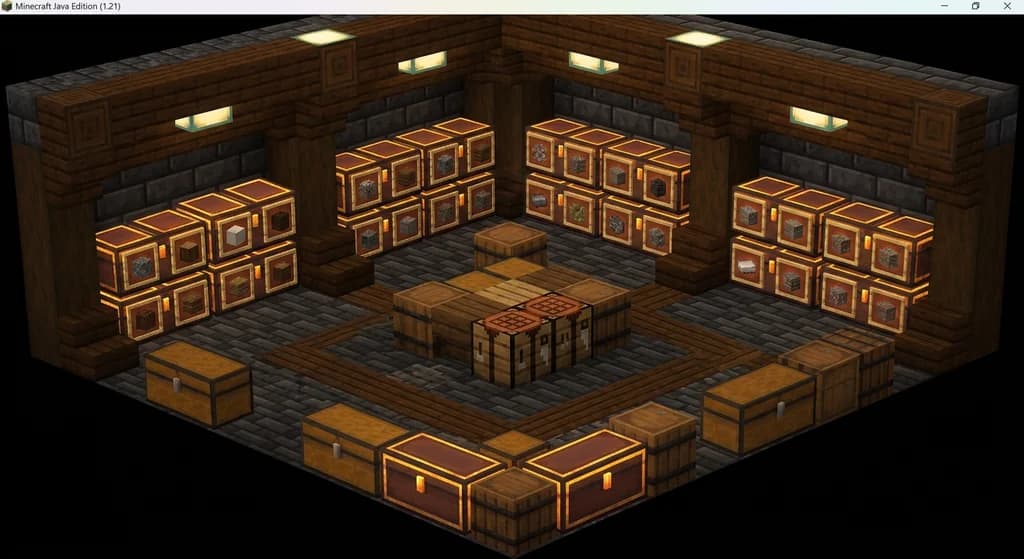
You've built a solid base, your farms are running, and now your storage room looks like a crime scene — 40 unlabeled chests, a double chest of miscellaneous "I'll sort this later" junk, and you still can't find your iron ingots. Sound familiar? Minecraft's vanilla storage system is intentionally simple, and that simplicity becomes a real problem the moment your item count climbs past a few dozen types. The good news: minecraft storage management mods exist specifically to solve this, and the best ones feel like they should have been in the base game all along.
This guide walks you through the top mods, how to install and configure them, and the exact setup strategy that keeps your base clean from early game through late game.
Why Vanilla Storage Breaks Down
Vanilla Minecraft gives you the wooden chest and, eventually, the barrel. That's essentially it. Each chest holds 27 slots, a double chest holds 54, and there's no built-in way to search, sort, or filter. Once you're farming multiple biomes, running a mob farm, and gathering crafting materials for dozens of recipes, you can easily accumulate 300+ unique item types — far more than any manual labeling system can handle cleanly.
The result is the classic "chest room spiral": you add more chests, lose track of categories, and spend more time hunting for items than actually playing.
Warning: Trying to solve this with more vanilla chests just delays the problem. Without a sorting or search system, every new chest you add makes the problem worse, not better.
What Are Minecraft Storage Management Mods?
Minecraft storage management mods are modifications that expand, automate, or network your item storage beyond what vanilla chests provide. They fall into three broad categories:
- Chest upgrade mods — Replace or enhance vanilla chests with larger, smarter variants (e.g., Iron Chests, Sophisticated Storage)
- Network/interface mods — Connect multiple chests into one searchable terminal (e.g., Tom's Simple Storage, Refined Storage)
- Inventory sorting mods — Auto-sort your personal inventory and hotbar (e.g., Inventory Profiles Next)
The vanilla-plus philosophy — which you can read more about in our guide to 7 Best Minecraft QoL Mods That Improve Your Vanilla World in 2026 — is to add convenience without replacing core gameplay loops. Storage mods fit that philosophy perfectly.
Best Minecraft Storage Mods for Vanilla Plus Play
Here's a quick comparison of the top options across categories:
| Mod | Type | Loader | Learning Curve | Best For |
|---|---|---|---|---|
| Sophisticated Storage | Chest upgrades | Forge + Fabric | Low–Medium | Most players |
| Iron Chests | Larger chests | Forge + Fabric | Very Low | Beginners |
| Tom's Simple Storage | Network interface | Forge + Fabric | Medium | Mid-game scaling |
| Inventory Profiles Next | Inventory sorting | Fabric (+ Forge) | Very Low | Everyone |
| Refined Storage | Full AE-style network | Forge | High | Late-game power users |
Sophisticated Storage
Sophisticated Storage is a mod that adds tiered, fully upgradeable chests — iron through netherite — each with a modular upgrade system. You slot in upgrade cards to add features like auto-sorting, item filtering, deposit-all buttons, and even experience storage. No power grid required. It's the closest thing to a "perfect" vanilla-plus storage mod because it scales with your progression naturally.
According to its Modrinth listing, Sophisticated Storage has been downloaded over 15 million times across all versions, making it one of the most-downloaded storage mods on the platform.
Iron Chests
Iron Chests is the simplest upgrade path: craft better chests from iron, gold, diamond, or netherite, each holding progressively more items (up to 108 slots for a double crystal chest). There are zero new mechanics. If you just want more space without learning a new system, this is your mod.
Tom's Simple Storage
Tom's Simple Storage is a network mod that connects all your chests through a cable system and exposes them via a single search terminal. It's dramatically simpler than Refined Storage or Applied Energistics 2, making it ideal for players who want searchable storage without building a power infrastructure.
Pro Tip: Combine Sophisticated Storage chests with Tom's Simple Storage network cables. You get the upgrade benefits of Sophisticated Storage AND the searchable interface of Tom's — the best of both worlds with no power requirement.
For a broader look at how these fit into a full modpack, check out our Top 7 Minecraft Chest and Storage Mods for Vanilla+ Play 2026 roundup.
How to Set Up Sophisticated Storage Step by Step
Getting Sophisticated Storage running takes about 15 minutes. Here's the exact process:
- Download the mod from Modrinth or CurseForge. Match the version to your Minecraft instance (1.20.1, 1.21.x, etc.).
- Install your mod loader — Forge or Fabric. If you're unsure which to use, our How to Build Your Own Vanilla Plus Minecraft Modpack in 2026 guide covers the decision in detail.
- Drop the .jar file into your
/modsfolder and launch the game. - Craft a basic iron chest using the Sophisticated Storage recipe (iron ingots surrounding a vanilla chest).
- Add upgrade slots — right-click the chest to open its UI, then craft and insert upgrade cards.
Essential Upgrade Cards to Craft First
- Sort Upgrade — automatically sorts items alphabetically or by count when you close the chest
- Filter Upgrade — restricts a chest to only accept specific items (great for dedicated chests per category)
- Deposit Upgrade — adds a "deposit all matching items" button so you can dump your inventory in one click
- Compacting Upgrade — auto-crafts items into compressed forms (9 iron nuggets → 1 iron ingot)
Note: Upgrade cards require their own crafting recipes and materials. Check the in-game recipe book (press
E, then the book icon) or a mod wiki to see exact ingredient lists, since they vary by mod version.
Tips for Keeping Your Storage System Organized
Even the best mod won't save you if your organizational habits are chaotic. These principles hold regardless of which mod you choose:
Categorize Before You Build
Plan your categories first. A clean system usually has 6–8 top-level categories:
- Raw materials (ores, logs, stone)
- Processed materials (ingots, planks, slabs)
- Food & farming
- Mob drops
- Building blocks
- Tools & equipment
- Redstone components
- Miscellaneous / overflow
Use item frames on the front of each chest or chest group to label categories visually. It takes five minutes and saves hours.
Use Filter Upgrades Religiously
The single biggest mistake players make is skipping filter upgrades to save materials. Don't. A chest without a filter will fill up with random overflow items within a day of play, destroying your system. Craft filter upgrades for every dedicated chest before you start filling them.
Keep a Dedicated Overflow Chest
No matter how good your system is, you'll always have edge-case items. Designate one large chest as the "overflow" or "misc" chest. Empty it into the right places once a week of playtime. This prevents the slow entropy that turns organized storage rooms into chaos over time.
For more QoL strategies like this, the Best Minecraft Modpacks for a Vanilla-Plus Experience in 2026 guide includes full modpack recommendations that bundle storage mods with other quality-of-life upgrades.
How to Put This Into Practice on Gaia Legends
Gaia Legends runs a vanilla-plus modpack philosophy, which means the resource economy is deep — rare materials, custom item sets, and a player-driven market all reward players who manage their inventories efficiently. Falling behind on storage organization means missing crafting windows, losing track of rare drops, and wasting time you could spend progressing.
On Gaia Legends, the item economy includes custom legendary gear sets and crafting materials that stack up fast. A Sophisticated Storage setup with dedicated filter chests for each material tier — common, uncommon, rare — keeps your crafting pipeline clean and your reaction time fast when a new recipe unlocks.
The server's crossplay support also means you might be trading items with Bedrock players, so having a searchable, organized storage system lets you locate trade goods instantly without making your trading partner wait.
Gaia Legends is free to join, non-pay-to-win, and supports Java + Bedrock crossplay. Join at gaialegends.pro and start your legend today.
Conclusion
Storage chaos is one of the most common reasons players quit a survival world — not because the game got hard, but because it got tedious. The right mods eliminate that tedium entirely. Here are the three things to take away:
- Start with Sophisticated Storage for a low-friction, upgradeable chest system that scales from early game through endgame
- Add Tom's Simple Storage once your item count outgrows manual browsing — a searchable terminal changes everything
- Organize with intention: categories, filter upgrades, and an overflow chest prevent the entropy that kills storage systems over time
Install one mod today, set up your filter upgrades, and you'll never lose your iron ingots again.
Ready to play? Join Gaia Legends today — no pay-to-win, Java + Bedrock crossplay.
- Java:
join.gaialegends.pro - Bedrock:
join.gaialegends.pro— Port19132
Further reading
These references were recorded with the article; specific claims have not been matched to source excerpts.
Frequently Asked Questions
What are the best Minecraft storage management mods for vanilla plus play?
The best Minecraft storage management mods for vanilla-plus play are Sophisticated Storage (upgradeable chests with filter and sort modules), Iron Chests (simple larger chest variants), Tom's Simple Storage (a searchable network terminal), and Inventory Profiles Next (auto-sorts your personal inventory). Sophisticated Storage is the top all-rounder because it scales from early to late game without requiring a power grid.
Does Sophisticated Storage work on Fabric and Forge?
Yes. Sophisticated Storage is available for both Fabric and Forge across multiple Minecraft versions including 1.20.1 and 1.21.x. Download the correct version for your mod loader from Modrinth or CurseForge. The mod also has a companion mod called Sophisticated Backpacks that adds the same upgrade system to wearable backpacks.
How do I connect all my chests into one searchable interface in Minecraft?
Use Tom's Simple Storage or Refined Storage. Tom's Simple Storage is the simpler option: craft a storage terminal and connect it to your chests via network cables. All connected chests appear in a single searchable UI. Refined Storage offers more automation features but has a steeper learning curve and requires a power source.
What is the inventory organization mod that auto-sorts with one key press?
Inventory Profiles Next (IPN) is the most popular inventory sorting mod. It adds a one-click sort button to your inventory screen and lets you assign a hotkey to sort your hotbar automatically. It's available on Fabric and supports profiles so you can lock specific slots to specific item types. It works alongside chest mods without conflicts.
Can I use storage mods on a multiplayer Minecraft server?
Yes, but the mod must be installed server-side as well as client-side for chest and network mods like Sophisticated Storage or Tom's Simple Storage. Inventory-only mods like Inventory Profiles Next are client-side only and work on any server. Always check the mod's page on Modrinth or CurseForge for server compatibility notes before installing.
How many items can a Sophisticated Storage netherite chest hold?
A Sophisticated Storage netherite chest has significantly more base slots than a vanilla chest, and its capacity can be further expanded with stack upgrade cards that multiply the stack size per slot. The exact slot count depends on the mod version, but netherite-tier chests are designed to hold thousands of items when fully upgraded. Check the official mod wiki for version-specific slot counts.
Related guides
7 Best Forge Minecraft Mods for Vanilla+ Gameplay in 2026
Discover the 7 best Forge Minecraft mods for a vanilla+ experience in 2026. Improve QoL, performance, and immersion without breaking the base game feel.
How to Find the Perfect Vanilla-Enhanced Minecraft Modpack in 2026
Struggling to find the right vanilla-enhanced modpack? Use this 2026 modpack finder guide to discover lightweight packs that boost performance and QoL.
What is the Homestead Minecraft Modpack? Complete 2026 Guide
Learn what the Homestead Minecraft modpack is, which mods it includes, how to install it, and why it's one of the best cozy farming modpacks in 2026.

How to Build Your Own Vanilla Plus Minecraft Modpack in 2026
Learn how to build a vanilla plus modpack in 2026 — from picking a mod loader to stacking QoL, performance, and immersion mods. Step-by-step guide inside.
Have a question or another approach?
Compare notes with other readers. Include your edition and version when discussing mechanics.