7 Best Analogous Block Palettes for Cohesive Minecraft Builds (2026)
Filed under Minecraft Build Palette & Block Harmony · How we create content
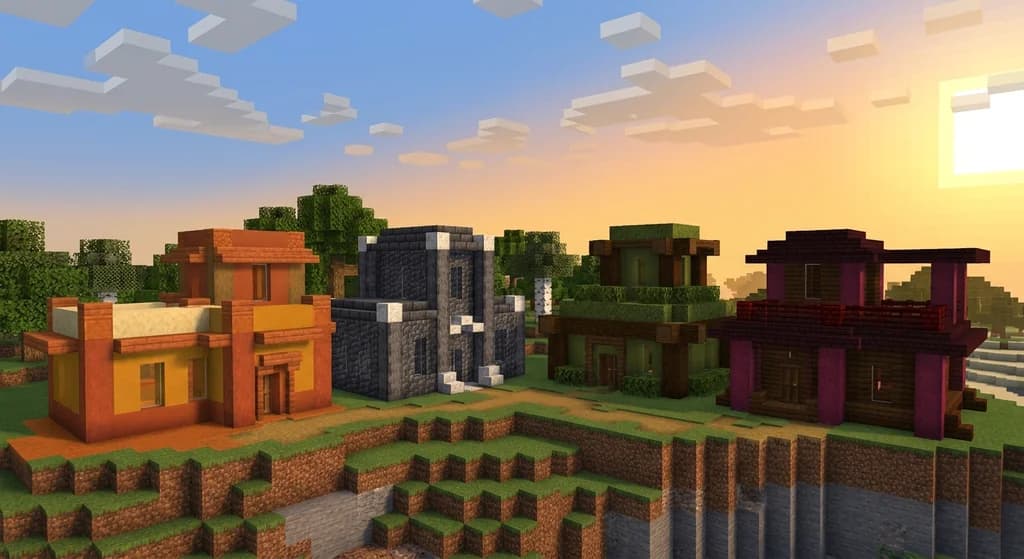
Key Takeaways
| Point | Details |
|---|---|
| Analogous palettes defined | An analogous block palette uses blocks that share adjacent hues on the color wheel, creating natural visual flow without jarring contrast. |
| Three-to-five blocks is the sweet spot | Using fewer than three blocks looks flat; more than five starts to feel chaotic and unfocused. |
| Texture variation matters as much as color | Mixing smooth, rough, and slab variants within the same hue family adds depth without breaking harmony. |
| Warm palettes suit organic builds | Terracotta, sandstone, and copper families work best for deserts, villages, and earthy fantasy structures. |
| Cool palettes elevate modern and cave builds | Deepslate, calcite, and blue ice create sleek, cohesive underground or futuristic aesthetics. |
| Accent blocks seal the deal | One carefully chosen accent block — used at roughly 5–10% coverage — gives an analogous palette a focal point without disrupting harmony. |
Table of Contents
- What Are Analogous Block Palettes in Minecraft?
- Why Analogous Palettes Make Your Builds Look Pro
- Best 7 Analogous Block Palettes for Minecraft Builds
- How to Apply an Analogous Palette Step by Step
- Analogous vs. Other Color Schemes: Quick Comparison
- Tips for Choosing the Right Analogous Palette
- How to Put This Into Practice on Gaia Legends
- Conclusion
- Frequently Asked Questions
- Recommended
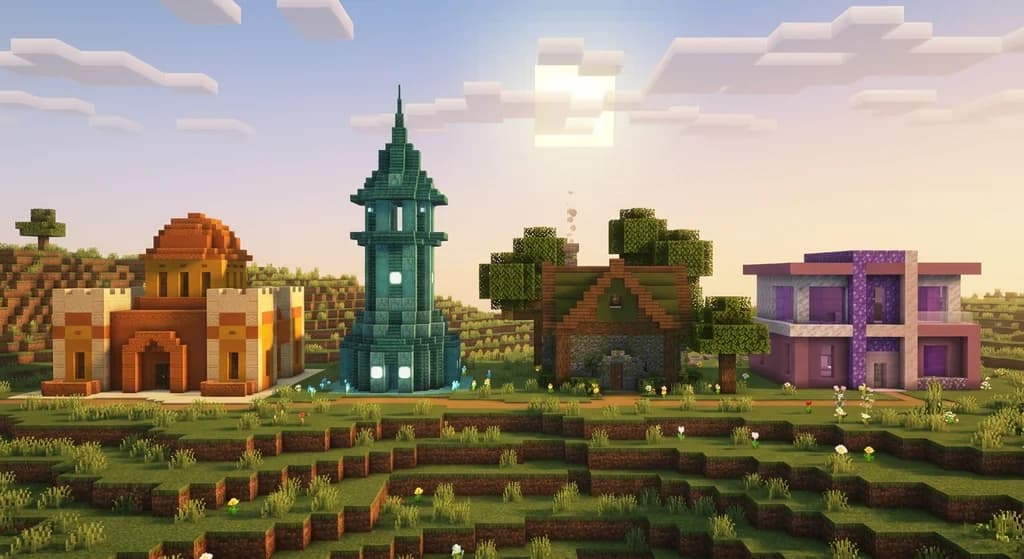
Most Minecraft builds don't fail because of bad shapes — they fail because of bad color choices. Slapping stone bricks next to oak planks next to red wool creates visual noise that no amount of clever detailing can fix. Analogous block palettes solve this problem at the root. By choosing blocks that naturally sit in the same color family, you get harmony for free. This guide breaks down the 7 best analogous palettes you can use right now, the exact blocks that make each one sing, and the simple rules that keep your builds looking cohesive every time.
What Are Analogous Block Palettes in Minecraft?
An analogous block palette is a set of Minecraft blocks whose colors occupy adjacent positions on the color wheel — typically spanning no more than 60–90 degrees of hue. In plain terms, it means picking blocks that all feel "warm" together (tans, oranges, reds) or all feel "cool" together (blues, grays, greens) rather than mixing opposite ends of the spectrum.
The concept comes directly from traditional color theory, where analogous color schemes are praised for their natural, soothing harmony. Minecraft's block library is enormous enough that you can build a full analogous palette entirely within vanilla blocks — no texture packs required.
Why Three to Five Blocks Is the Magic Number
Using only two blocks creates a flat, boring surface. Using six or more starts to feel cluttered. The sweet spot is three to five blocks per palette:
- One base block (60–70% of your build surface)
- One or two secondary blocks (20–30% combined)
- One accent block (5–10% for focal points and trim)
This ratio gives your build visual rhythm without chaos.
Why Analogous Palettes Make Your Builds Look Pro
Cohesive Minecraft building comes down to one thing: reducing visual competition between blocks. When every block in your build shares a similar hue, the eye reads the shape of the structure instead of getting distracted by color clashes.
Pro Tip: Before you place a single block, hold your planned blocks side by side in your hotbar and look at them in natural daylight. If they feel like they belong in the same landscape, they'll work together in a build.
Professional builders on large servers consistently use analogous palettes for their spawn hubs and player-facing structures because the style reads well from a distance — which matters enormously when other players are flying or riding past at speed.
Best 7 Analogous Block Palettes for Minecraft Builds
1. Desert Warmth — Sandstone, Terracotta, and Smooth Sandstone
This is the most beginner-friendly analogous palette in the game. Sandstone provides your neutral base, smooth sandstone adds a refined lighter tone, and terracotta (plain or orange-stained) deepens the warmth. Add cut sandstone as trim for instant sophistication.
Best for: desert temples, market towns, Mediterranean-style villas.
For a deeper look at warm-tone desert builds, check out our How to Build Desert Masterpieces: 2026 Block Harmony Guide.
2. Forest Floor — Moss Block, Rooted Dirt, and Muddy Mangrove Roots
Three blocks that look like they grew together naturally. Moss block anchors the green, rooted dirt pulls in warm brown undertones, and muddy mangrove roots add dark, organic texture. Scatter mossy cobblestone for variation.
Best for: ancient ruins, overgrown cottages, druid circles.
3. Deepslate Depths — Deepslate, Calcite, and Tuff
The definitive cool-gray analogous palette. Deepslate bricks give you a dark, textured base; calcite lightens the midtones; tuff sits between them with a warm-gray undertone that stops the palette from feeling cold and sterile.
Best for: cave bases, underground fortresses, modern bunkers. If you're building underground, our 7 Best Underground Block Palettes for Minecraft Cave Bases (2026) pairs perfectly with this palette.
4. Nether Ember — Crimson Stem, Nether Brick, and Blackstone
All three blocks share red-to-black undertones that feel volcanic and dangerous. Crimson stem brings organic warmth, nether brick adds structure and history, and blackstone grounds the palette in shadow. Use gilded blackstone sparingly as your accent.
Best for: hellish fortresses, villain lairs, dark fantasy castles.
5. Ocean Mist — Prismarine, Dark Prismarine, and Blue Terracotta
A cool-blue analogous palette that shimmers. Prismarine is the animated heart of this palette — its shifting texture adds life. Dark prismarine deepens the shadows, and blue terracotta provides a matte counterpoint that keeps the build grounded.
Best for: ocean monuments, underwater cities, aquatic research stations.
6. Birch & Bone — Birch Planks, White Concrete, and Smooth Quartz
A light, airy palette built on creamy whites and soft yellows. Birch planks bring warmth and grain, white concrete adds clean modern lines, and smooth quartz provides subtle off-white variation. This palette photographs beautifully in screenshots.
Best for: modern houses, Japanese-inspired builds, clean fantasy architecture.
7. Autumn Canopy — Dark Oak, Stripped Spruce, and Coarse Dirt
Rich, earthy, and deeply satisfying. Dark oak planks anchor the palette in deep brown; stripped spruce lightens it with honey-gold tones; coarse dirt adds a raw, grounded texture at the base. Use brown mushroom blocks as a surprise accent.
Best for: taverns, forest cabins, harvest-festival builds.
Note: Lighting dramatically shifts how analogous palettes read in-game. Always test your palette in both daytime and torchlight before committing to a large structure. A palette that looks warm and inviting at noon can look muddy at night without careful light source placement.
How to Apply an Analogous Palette Step by Step
- Pick your hue family first. Decide whether your build lives in the warm (red/orange/yellow), cool (blue/green/purple), or neutral (gray/brown) zone.
- Select your base block. This covers the majority of your walls, floors, or terrain.
- Choose two supporting blocks. One lighter, one darker than your base.
- Add a single accent block. This should contrast slightly in texture — not in color. Slabs, stairs, and chiseled variants of your base block work perfectly.
- Build a 5×5 test panel before scaling up. Step back and squint at it. If it reads as one unified surface, you're good to go.
Warning: Resist the urge to add a "pop of color" from a completely different hue family. Even one mismatched block — like a red wool accent on a cool-gray deepslate build — can break the harmony of the entire structure.
Analogous vs. Other Color Schemes: Quick Comparison
| Scheme | Hue Range | Mood | Difficulty |
|---|---|---|---|
| Analogous | Adjacent (60–90°) | Calm, unified, natural | Easy |
| Complementary | Opposite (180°) | High contrast, bold | Medium |
| Triadic | Three evenly spaced | Vibrant, complex | Hard |
| Monochromatic | Single hue, varied value | Minimal, sleek | Easy |
For builds where you want bold contrast instead of harmony, see our How to Use Complementary Colors: A Minecraft Build Guide (2026). And if you want to push into three-hue complexity, our 7 Best Triadic Block Palettes: A Minecraft Build Tutorial (2026) covers that territory in depth.
Tips for Choosing the Right Analogous Palette
Match Your Biome
Your build's surrounding biome is free analogous context. A sandstone palette in a desert biome feels inevitable — in a snowy tundra, it looks dropped in from another dimension. Let the landscape guide your hue family.
Use Texture Contrast Within the Same Hue
The biggest mistake beginners make with analogous palettes is choosing blocks that are too similar in texture as well as color. You want color harmony but texture variety. Smooth quartz and chiseled quartz share a hue but offer very different surface reads — that tension is what makes a build visually interesting.
Don't Neglect the Underside
Floors and ceilings are part of your palette too. Many builders nail their walls and then slap down stone brick floors that clash with everything above. Choose your floor block as part of your original palette selection, not as an afterthought.
Pro Tip: If you're struggling to choose between two palette options, use a Minecraft palette generator tool to preview block combinations before placing them. Our guide on How to Use a Minecraft Palette Generator for Block Harmony (2026) walks you through the best free tools available.
How to Put This Into Practice on Gaia Legends
Gaia Legends is where these palettes stop being theory and start being architecture. Our custom SMP server features hand-crafted spawn areas and player hubs built entirely on analogous color principles — you can walk through them the moment you log in and see exactly how the Desert Warmth and Deepslate Depths palettes behave at full scale.
The server's Build Showcase feature lets you submit your own analogous builds for community voting, so you get real feedback on whether your palette is landing. Our Creative Plots zone gives you a flat canvas to test palette combinations before committing them to your survival world. And our Block Palette Workshop events — held monthly — pair newer builders with experienced community members who can give live palette feedback.
Gaia Legends is free to join, non-pay-to-win, and supports Java + Bedrock crossplay. Whether you're testing your first analogous palette or refining a server-quality spawn hub, there's a community here ready to help.
Join at gaialegends.pro and start your legend today.
Conclusion
Analogous block palettes are the single fastest upgrade you can make to your Minecraft building. Three things to remember:
- Stick to three to five blocks within the same hue family — base, secondary, and accent.
- Vary texture, not hue — harmony comes from color, interest comes from surface variation.
- Test before you scale — a 5×5 sample panel saves hours of tearing down mismatched walls.
Pick one palette from this list, build a small test structure this session, and notice how much more intentional your work looks. The blocks haven't changed — just the logic behind how you're choosing them.
Ready to play? Join Gaia Legends today — no pay-to-win, Java + Bedrock crossplay.
- Java:
join.gaialegends.pro - Bedrock:
join.gaialegends.pro— Port19132
Further reading
These references were recorded with the article; specific claims have not been matched to source excerpts.
Frequently Asked Questions
What are analogous block palettes in Minecraft and why do they matter?
Analogous block palettes in Minecraft are sets of blocks whose colors sit adjacent on the color wheel — think sandstone, terracotta, and orange concrete all sharing warm tan-to-orange tones. They matter because they eliminate visual clashing, making your builds look intentional and cohesive rather than random. Most professional-looking Minecraft structures rely on analogous palettes as their foundation, even if the builder doesn't use that term.
How many blocks should be in a Minecraft analogous palette?
The ideal analogous palette uses three to five blocks: one dominant base block covering 60–70% of the surface, one or two secondary blocks at 20–30% combined, and one accent block at just 5–10%. Fewer than three blocks looks flat and boring. More than five starts to feel chaotic. This ratio gives your build visual rhythm and depth without breaking color harmony.
What is the best analogous block palette for beginners in Minecraft?
The Desert Warmth palette — sandstone, smooth sandstone, and plain terracotta — is the most forgiving starting point. All three blocks are easy to obtain, they blend naturally in most biomes, and the warm tan-to-orange range is wide enough that small mistakes don't break the harmony. Cut sandstone works as a built-in trim block without needing a separate accent choice.
Can I use analogous palettes in the Nether or End dimensions?
Absolutely. The Nether Ember palette (crimson stem, nether brick, blackstone) is a strong analogous choice that feels native to Nether builds. For the End, pale purpur blocks, end stone bricks, and obsidian share cool purple-to-gray undertones. The key is picking blocks whose hues already exist in that dimension so the build feels like it belongs there rather than being imported.
How do I stop my analogous palette from looking too flat or boring?
Texture variation is your best tool. Choose blocks that share a hue but differ in surface texture — for example, deepslate bricks (rough), calcite (smooth), and tuff (grainy) all live in the same gray family but look completely different up close. Also use slab and stair variants of your base block to add depth to flat walls. Lighting placement matters too — sea lanterns or shroomlights can create warm focal points within a cool-toned build.
Do analogous palettes work for large server builds and spawn areas?
Yes — in fact, analogous palettes are the preferred choice for large-scale server builds precisely because they read clearly from a distance. When players are flying or riding past a structure at speed, high-contrast or clashing palettes create visual noise. An analogous palette lets the eye read the shape of the build instantly. Server spawn hubs, player markets, and community hubs almost universally use analogous or monochromatic schemes for this reason.
Related guides
7 Best Tetradic Block Palettes for Minecraft Builds (2026)
Discover 7 tetradic Minecraft block palettes for 2026 builds. Learn color theory, block combos, and how to use four-color harmony for stunning structures.
7 Best Complementary Block Palettes for Minecraft Builds 2026
Master modern Minecraft block combinations with 7 expert complementary palettes for 2026. High-contrast combos, color theory tips, and pro builder...
Best Gothic Block Combinations for Minecraft Builds in 2026
Master the best gothic block combinations for Minecraft in 2026. Expert dark fantasy palettes, deepslate architecture tips, and material lists for...
7 Best Analogous Block Palettes for Minecraft Builds (2026)
Master analogous color palettes in Minecraft with 7 expert block combos for 2026. Learn color harmony rules, pro tips, and block pairings that win build...
Have a question or another approach?
Compare notes with other readers. Include your edition and version when discussing mechanics.