Minecraft world spawn: mechanics and gameplay strategies
Filed under Minecraft Tips & Tricks · How we create content

TL;DR:
- World spawn in Minecraft is the default respawn point that shapes resource access and community interactions. Proper control and design of spawn areas can significantly enhance server longevity, player retention, and gameplay experience. Strategically customizing spawn with safe zones, resource proximity, and aesthetic features creates a strong social and functional foundation for any world.
Most players glance at the spot where they first load into a new world, punch a tree, and never think about world spawn again. That is a mistake that costs servers their community feel and players their survival edge. World spawn is not just a random coordinate Minecraft throws at you on day one. It is the heartbeat of your world's layout, the anchor point for respawning, and a powerful lever for shaping how an entire server plays out. Once you truly understand what drives spawn selection and how to control it, you gain one of the most underutilized tools in all of Minecraft.
Table of Contents
- What is world spawn in Minecraft?
- Mechanics of world spawn: generation and location
- How world spawn affects gameplay and server strategy
- How to optimize and control world spawn
- Why most guides miss the true potential of world spawn
- Get expert guidance for your server's world spawn
- Frequently asked questions
Key Takeaways
| Point | Details |
|---|---|
| World spawn shapes gameplay | The location of world spawn affects resources, player placement, and server dynamics. |
| Customize for community | Optimizing world spawn enhances multiplayer experience and encourages creative builds. |
| Command and mod control | You can use commands and mods to reposition or redesign world spawn for better gameplay. |
| Avoid common pitfalls | Select safe, accessible terrain for spawn to prevent frustrating player experiences. |
| Spawn as design catalyst | A thoughtfully designed world spawn creates engaging story and lasting game worlds. |
What is world spawn in Minecraft?
World spawn is the default location where every new player first appears when they enter a Minecraft world for the first time. If a player dies without having slept in a bed or set a personal respawn point, they return to this same area. It is not a single precise block. It is a region, typically a square area up to 20x20 blocks, where Minecraft can place players at random within that zone on entry or respawn.
Here is where many players get confused. World spawn and your personal spawn are two completely different things. Your personal spawn is set by sleeping in a bed or using a respawn anchor in the Nether. World spawn is the server-wide default. The moment you set a bed, your death respawn uses your bed location instead. But if that bed is destroyed or missing, you bounce right back to world spawn. Understanding this distinction is critical, especially on survival multiplayer servers where dozens of players share the same world.
World spawn also has a direct relationship with mob spawning mechanics, because the game uses spawn as a reference point for certain mob rules and chunk loading priorities. It is also deeply tied to SMP mechanics and world spawn, where the placement of spawn can either unify a community or accidentally fracture it.
Key facts about world spawn you should know:
- It is chosen during world generation and defaults to near the coordinate origin (0, 0) unless adjusted.
- The spawn radius, controlled by the "spawnRadius` game rule, defaults to 10 blocks in vanilla Minecraft.
- Players in creative mode or with specific permissions can teleport freely, but world spawn still serves as the default anchor.
- In singleplayer, world spawn matters less but still controls respawn if your bed is missing.
- In multiplayer, world spawn shapes server traffic, resource depletion rates, and community gathering spots.
Quick stat: In vanilla Minecraft, the default spawn radius is set to 10 blocks, meaning players can appear anywhere within a 10-block distance of the actual world spawn coordinate on first entry or respawnment without a bed.
Now that we have established why world spawn matters, let us dive deeper into its mechanics and how players can control it.
Mechanics of world spawn: generation and location
When Minecraft generates a new world, it does not just slap spawn down on the nearest block. The algorithm is more thoughtful than that. The game searches outward from coordinate (0, 0) and looks for a safe, habitable starting biome. Hazardous biomes like ocean monuments, lava-filled terrain, deep ocean, and certain extreme landscapes are actively avoided during this scan. The result is that world spawn typically lands somewhere on dry, walkable land with at least some nearby resources.
Here is how the selection process works step by step:
- Minecraft starts its search at coordinate (0, 0) on the X and Z axes.
- It scans outward in a spiral pattern looking for a suitable biome category.
- Once a safe biome is found, the Y coordinate (height) is calculated to place the spawn on the surface.
- The exact block chosen becomes the world spawn point, stored in the world's level data.
- The
spawnRadiusgame rule determines how far from that point players can appear.
The type of biome matters a lot here. Plains and forests are among the most commonly selected biomes for spawn because they are flat, resource-rich, and considered safe by the generation algorithm. Desert and jungle biomes appear occasionally but are less ideal. Swamps and dark forests can sometimes appear near spawn, which creates immediate mob pressure on new players, which is a problem that smart server admins address quickly.
| Biome type | Typical spawn suitability | Common issues |
|---|---|---|
| Plains | High | Low tree density |
| Forest | High | Good wood access |
| Desert | Medium | No water, sparse food |
| Swamp | Low | High mob pressure at night |
| Ocean | Very low | Immediate drowning risk |
| Dark forest | Low | Witch huts, mob density |
The multiplayer spawning safety considerations change drastically once you move from singleplayer to a server environment. On a server, the game rule spawnRadius can be set to 0, forcing all players to spawn on exactly one point. That sounds tidy, but it creates a traffic jam. Alternatively, setting it very wide spreads players out naturally. There is real strategy in choosing that number based on your server's player count and intended experience.
How world spawn impacts multiplayer environments goes well beyond just the spawn radius. Server owners often relocate spawn entirely using the /setworldspawn command, which lets you place spawn anywhere in the world regardless of the original generation point. This opens up creative possibilities like building a custom spawn hub at a scenic mountain biome or placing spawn at the entrance to a purpose-built lobby area.
Pro Tip: Always scout your intended spawn location on foot before committing it with /setworldspawn. Walk the surrounding terrain and check for lava pockets, deep water, cliffs, or unstable ground within 50 blocks. What looks fine on a map view can become a death trap for new players at ground level.
Understanding the mechanics is just the start. Let us compare how world spawn influences different play styles and server types.
How world spawn affects gameplay and server strategy
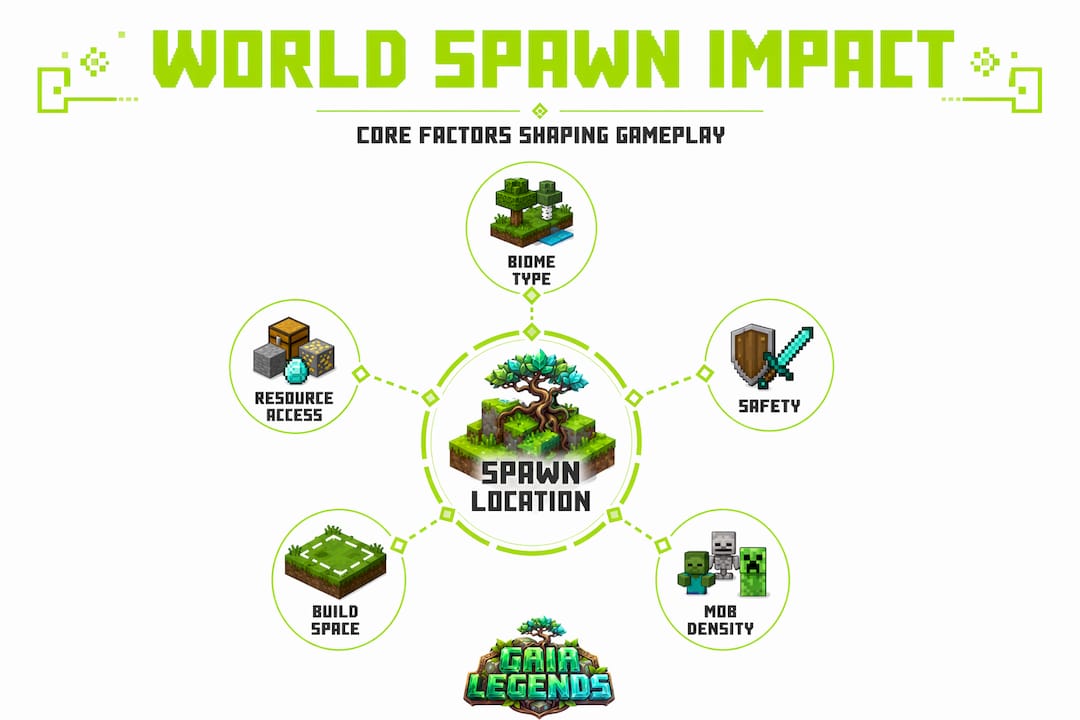
World spawn is arguably the single most impactful coordinate in any Minecraft world. Where you place it sets the tone for everything that follows. On survival servers, spawn location shapes early-game resource access. If spawn drops players in a plains biome, they have flat land and easy wood access but may need to travel for stone hills. If spawn lands near a jungle, wood is everywhere but navigation is a nightmare for new players.
From a server strategy standpoint, world spawn acts as a gravitational center. Players naturally build, trade, and interact closest to where they first arrived. This means:
- Community hubs and markets often develop naturally around spawn.
- Spawn-adjacent land gets claimed first, which can create scarcity conflicts on competitive servers.
- Mob event zones, public farms, and communal builds cluster around spawn, increasing server engagement.
- New player retention rises when spawn provides clear direction, nearby resources, and a welcoming environment.
"The spawn area is your server's front door. If it is broken, dark, or confusing, most visitors will not come back."
The relationship between spawn and mob density is another layer worth understanding. Minecraft's mob spawning caps are partly calculated relative to loaded chunks, and spawn is always loaded when the server is running. This means hostile mobs can accumulate around a poorly lit spawn faster than in any other part of the world. Lighting the spawn area thoroughly is not just aesthetics. It is functional mob control.
Understanding OP roles on a server directly connects to how spawn is managed. Operators set spawn protection, which is a radius around world spawn where only ops can place or break blocks. The default protection radius is 16 blocks. This prevents griefing at spawn but also limits where regular players can build freely near it.
Here is a practical comparison of spawn strategies for different server types:
| Server type | Ideal spawn style | Key design priority |
|---|---|---|
| Survival SMP | Natural biome, open space | Resource access, low mob density |
| RPG/adventure | Custom built hub or town | Story immersion, clear directions |
| Creative server | Flat platform or gallery | Easy navigation, showcase visibility |
| Mini-game server | Lobby structure | Quick access to game portals |
| Hardcore survival | Remote or challenging biome | Reinforces difficulty theme |
For those interested in taking spawn aesthetics further, creative spawn builds can transform a simple arrival point into a centerpiece that makes players genuinely excited to explore further. Spawn does not have to be functional only. It can be the most memorable structure in your world.
With these effects in mind, how do you take control and optimize your world spawn for your own gameplay needs?
How to optimize and control world spawn
Taking control of world spawn is straightforward once you know the tools available. Whether you are running a large server or just a private world with friends, these strategies will help you set up a spawn that works in your favor.
Step-by-step: relocating world spawn with commands
- Choose your desired spawn location and travel there in-game.
- Stand at the exact block you want to serve as the new spawn center.
- Open your chat and type
/setworldspawnto set spawn at your current position. - Alternatively, use
/setworldspawn <x> <y> <z>to set it to specific coordinates. - Adjust the
spawnRadiusgame rule with/gamerule spawnRadius <value>to control player spread. - Test by having another player (or using
/killyourself) respawn and verify the location.
This command works in both singleplayer and on servers where you have operator permissions. The change is permanent until modified again and survives server restarts.
Designing a spawn area that works for players
A great spawn area is not just safe. It is clear and inviting. Here is what to prioritize:
- Flat, open ground: Give players room to move without immediately stumbling into cliffs or water.
- Good lighting: Torches, lanterns, or glowstone prevent mob spawning and improve visibility.
- Orientation markers: A sign, path, or large visual landmark tells players which way to head.
- Starter resources nearby: A community chest with basic tools, a crafting table, and some food dramatically improves new player experience.
- Clear spawn protection signage: Let players know what area is protected and where they can freely build.
World spawn design choices in RPG-style servers take this even further. Some server owners create entire welcome zones with NPCs (using command blocks or plugins), quest boards, and pathways leading to different zones of the world. These design choices turn spawn from a technical setting into a gameplay feature.
Server plugins and mods for advanced spawn control
If you are running a Paper or Spigot server, plugins give you significantly more control:
- EssentialsX: Includes
/setspawnand/spawncommands, letting players teleport back to spawn anytime. - WorldGuard: Allows you to define spawn regions with specific flags, blocking PvP, mob damage, or block breaking within defined zones.
- Multiverse: Handles spawn settings across multiple worlds simultaneously, essential for servers with separate survival, creative, and minigame worlds.
- LuckPerms: Lets you control which players can modify or teleport to spawn based on permission groups.
Pro Tip: If you use EssentialsX, set the /spawn command as available to all players without cooldown. It gives lost or overwhelmed new players an instant safe reset without needing mod support. This single quality-of-life feature noticeably reduces help requests in server chats.
Pitfalls to absolutely avoid
Mistakes at spawn have amplified consequences because every player experiences them. Watch out for:
- Placing spawn over an underground cave (players fall through the floor on respawn).
- Setting spawn in or near ocean biomes without a proper platform.
- Forgetting to set spawn protection, which allows griefers to destroy the spawn area.
- Making spawn too far from any resources, leaving new players stranded.
- Building spawn in an area with intense redstone contraptions that cause lag for everyone arriving.
The 2026 Minecraft features and world spawn updates also bring new considerations for spawn design, particularly with changes to biome generation and new terrain features. Staying current with update notes helps you anticipate how generation changes might affect spawn placement on newly created worlds.
Having drilled down into customization, let us consider what most guides miss and the deeper truths about world spawn's influence.
Why most guides miss the true potential of world spawn
Here is something most Minecraft guides will not tell you. They treat world spawn as a logistics problem. Fix the coordinates, light the area, done. That framing misses the bigger picture entirely.
World spawn is a cultural artifact for any long-running server. The blocks around spawn tell the story of your server's earliest days. The first builds, the first community gathering spots, the paths worn into the ground by hundreds of logins. These details accumulate into something that feels alive. When players arrive at a spawn that has character and history baked into its design, they sense it immediately. It creates belonging.
We have managed servers where spawn was meticulously optimized from a technical standpoint but felt cold and sterile. Players would log in, collect their starter kit, and head off to their private claim. Interaction was minimal. Compare that to servers where spawn had an organic town square feel, a market, some lore signs, a fountain, pathways branching off toward different biomes. Players lingered. They talked. They came back to spawn even after they had established remote bases, just because it was the social center of the world.
The longevity of a Minecraft world is not determined by its ruleset or its resource balance alone. It is shaped by the gravitational pull of its spawn. A well-designed spawn keeps players connected to the shared world rather than retreating into isolated silos.
Here is the contrarian truth: spending more design time on your spawn than on any other single build in your world is almost always worth it. Most players will never see your elaborate underground dungeon or your sky castle. But every single person who joins will spend their first moments at spawn. That first impression is doing more work for your server's community than any other feature.
Think about inspiring build ideas not just as decoration but as spawn infrastructure. A welcome statue, a themed gateway arch, a dynamic notice board updated with server events. These touches signal to new players that this world is cared for, and that feeling translates directly into engagement and retention.
World spawn is not a checkbox on your server setup list. It is your first conversation with every player who will ever join your world. Make it count.
Get expert guidance for your server's world spawn
You have just absorbed a serious amount of knowledge about world spawn mechanics, strategy, and design. But knowing the theory is only half the battle. Putting it into practice across every aspect of your server takes reliable, experience-backed guidance you can return to again and again.

Frequently asked questions
Can world spawn be customized in Minecraft?
Yes, you can change the world spawn location using the /setworldspawn command or server settings. Spawn mechanics can also be altered through world editing tools and server configuration files for more advanced setups.
What happens if you die and haven't set your personal spawn?
You will respawn at the world spawn location or within its radius. As confirmed by world spawn defaults, if no bed or respawn anchor is active, world spawn is the only fallback point the game uses.
Does world spawn impact multiplayer gameplay?
Absolutely. The world spawn location sets the tone for server activity, traffic patterns, and collaborative builds. World spawn's gameplay impact extends to resource depletion, community formation, and even player retention rates on long-running servers.
Are there mods for world spawn management?
Yes, several mods and plugins allow for advanced customization of world spawn and spawn areas. Tools like EssentialsX, WorldGuard, and Multiverse offer granular control, as explored in guides on RPG world design and server configuration.
What are common mistakes when setting world spawn?
Placing spawn in hazardous areas, congested spaces, or without access to initial resources are the most frequent pitfalls. Detailed guidance on avoiding spawn design mistakes covers terrain checks, lighting requirements, and protection zone planning to keep your spawn functional and player-friendly.
Recommended
Related guides
How to Obtain Mending in Minecraft
Learn how to get Mending in Minecraft. Discover the best methods: trading with librarian villagers, fishing, and looting chests. Includes mechanics and...
How to Use the Trident in Minecraft: Riptide, Channeling & Impaling
Learn how to use the trident in Minecraft with our quick reference guide. Covers Riptide, Channeling, Impaling enchantments, throwing mechanics, and...
How to Find Buried Treasure in Minecraft 2026: Maps & Tips
Master how to find buried treasure in Minecraft with our 2026 guide. Find treasure maps in shipwrecks & ruins, follow the X, and collect rare loot like...
Minecraft Combat Tips That Win Every Fight in 2026
Master Minecraft combat tips to dominate every fight in 2026! Learn essential strategies for weapons, timing, and terrain to become unbeatable.
Have a question or another approach?
Compare notes with other readers. Include your edition and version when discussing mechanics.