Understanding the Identify Control in Bedrock Edition
Filed under Minecraft Items, Ranks & Progression · How we create content
Version scope: Bedrock Edition Preview 26.10.25
Key Takeaways
| Point | Details |
|---|---|
| The Identify control was | The Identify control was renamed from Describe in Bedrock Preview 26.10.25. |
| Bedrock Edition shows item | Bedrock Edition shows item names with a black background and includes enchantments and shulker box contents. |
| Java Edition item names | Java Edition item names appear in italics without additional information. |
| The Identify control is | The Identify control is part of the Bedrock HUD and can be bound to a key or button. |
| Players can use the | Players can use the Identify control to quickly check blocks, items, and their properties. |
What Is the Identify Control in Bedrock Edition?
The Identify control is a dedicated input that reveals the name and details of the block or item you're looking at. If you've played Bedrock for a while, you probably knew it as the Describe control. In Bedrock Edition Preview 26.10.25, released on February 24, 2026, Mojang officially renamed it to Identify to better match its function.
Controls Updated the name for the Describe control to Identify.
Changes in Bedrock Preview 26.10.25
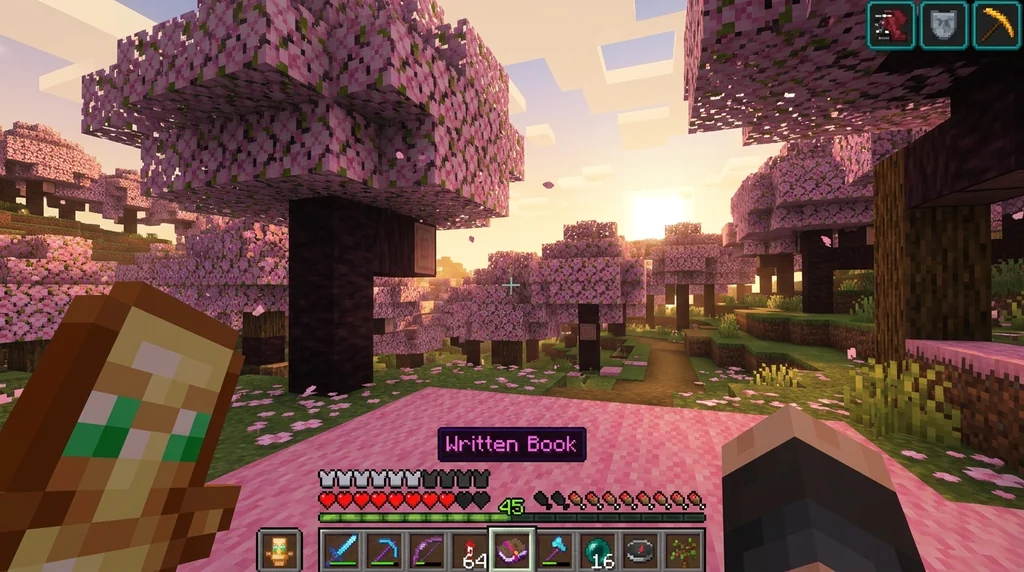
The rename is the headline change, but the control itself still works the same way. On touch devices you'll find a button on the HUD; on keyboard or controller you can bind it to any key or button. When activated, it shows the exact name of the targeted block or item, which is especially useful for distinguishing similar blocks like diorite vs. calcite or checking the enchantments on a friend's gear.
How Bedrock Displays Item Names
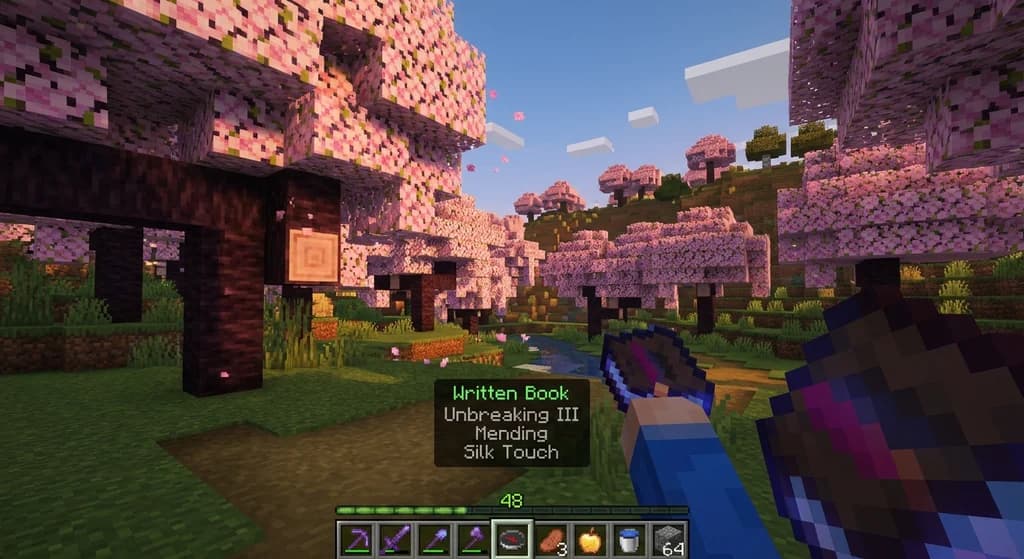
One major difference between Bedrock and Java Edition is how item names appear on the screen. In Bedrock, when you scroll through your hotbar (or use the Identify control), the item name appears with a solid black background and includes extra info such as enchantments and the contents of a shulker box. Java Edition, by contrast, shows the name in italics without any black box or additional data.
In Java Edition, this name appears in italics, while in Bedrock Edition, the text has a black background and also shows enchantments of the selected item, and contents of a shulker box.
This means the Identify control in Bedrock is more than a label—it gives you a quick peek at what's inside a container or how powerful a weapon really is.
Using the Identify Control on Custom Item Servers
If you play on servers with custom items, the Identify control becomes even more valuable. You can instantly see the bonus stats, set bonuses, or level requirements on any piece of gear. This pairs nicely with server mechanics where you need to check custom item leveling or reroll stats to optimize your loadout. Knowing what you're holding at a glance saves time and helps you make smarter upgrade decisions.
Comparing Bedrock and Java Edition HUD
The HUD itself is a system that overlays your health, hunger, hotbar, and other key information on the screen. Bedrock's mobile layout even moves the health and armor bars to the top left and hunger to the top right. But the Identify control is one small piece of that larger interface—one that Bedrock players get and Java players don't.
The HUD typically consists of the user's health, hunger, and experience bars, the hotbar, as well as a crosshair that designates the currently focused on block or entity if the player is not playing on a mobile device and has not enabled split controls.
Sources
- Controls Updated the name for the Describe control to Identify. — Bedrock Edition Preview 26.10.25
- In Java Edition, this name appears in italics, while in Bedrock Edition, the text has a black background and also shows enchantments of the selected item, and contents of a shulker box. — Heads-up display
- The HUD typically consists of the user's health, hunger, and experience bars, the hotbar, as well as a crosshair that designates the currently focused on block or entity if the player is not playing on a mobile device and has not enabled split controls. — Heads-up display
Frequently Asked Questions
Why was the Describe control renamed to Identify?
The rename was part of Bedrock Edition Preview 26.10.25, released on February 24, 2026. The new name 'Identify' more clearly describes the control's function: to identify the targeted block or item and show its details.
Related guides
How Gems Work in Minecraft Bedrock Capture the Flag
Learn how gems work in Minecraft Bedrock Capture the Flag, including how to earn them by playing, killing, and capturing flags. Spend 250 gems on the Flag...
How to Check Custom Item Leveling on a Minecraft Server
Check a Minecraft server's custom item rules before grinding. Identify the documented XP source, track progress, and verify upgrade costs and resets.

How to Earn Server Currency and Items by Voting on Minecraft Servers (2026
Learn how to earn exclusive currency and items by voting in official Minecraft events like the Mob Vote and Eerie Mojang Office Party. Step-by-step guide...
How to Get Limited-Time Event Items on Minecraft Server (2026)
Learn how to get limited-time event items on Minecraft servers in 2026. Step-by-step guide to earning exclusive seasonal gear on SMPs like Gaia Legends.
Have a question or another approach?
Compare notes with other readers. Include your edition and version when discussing mechanics.