How to Build a Command Block Currency Exchange for Your Minecraft Server
Filed under Minecraft Economy & Trading · How we create content
Version scope: Not edition-specific
Key Takeaways
| Point | Details |
|---|---|
| Command block currency exchanges | Command block currency exchanges let vanilla servers run a player economy without plugins. |
| Use emeralds as the | Use emeralds as the standard currency—villagers already use them as currency in trades. |
| A dummy scoreboard objective | A dummy scoreboard objective tracks each player's balance automatically. |
| Impulse and chain command | Impulse and chain command blocks handle item detection, removal, and credit addition in one button press. |
| The system can be | The system can be expanded with multiple exchange rates, bank balances, and transaction logs. |
| Test the build in | Test the build in a singleplayer or creative mode world before deploying to your server. |
Running a multiplayer server without an economy can feel like a free-for-all. Players often establish in-game economy by building shops to trade valuable resources like diamonds and enchanted items. But without a central currency exchange, trading quickly becomes chaotic. That's where a command block currency exchange comes in—a fully vanilla, plugin-free system that lets players convert resources at fixed or player-set rates.
Emeralds are the natural choice for your server's primary currency. A player can trade with them using emeralds as currency when dealing with villagers, and the same familiarity makes emeralds work perfectly for player-to-player trading. A command block exchange automates the process: players walk up, press a button to insert diamonds, iron, or gold, and receive emeralds instantly (or do the reverse).
This guide will walk you through building a compact, reliable currency exchange using nothing but command blocks, redstone, and a few decorative blocks. The system works identically in Java and Bedrock Edition, as long as command blocks are enabled (/gamerule commandBlockOutput false is recommended).
Materials Needed
| Item | Quantity | Purpose |
|---|---|---|
| Command blocks | 5–12 | Impulse and chain blocks for logic |
| Redstone blocks | 2–4 | Powering command blocks |
| Buttons | 1 per exchange option | Player input |
| Signs | 1 per option | Display exchange rate |
| Hoppers (optional) | 2 | Collect physical items if using item-based system |
| Chest (optional) | 1 | Store collected items |
| Building blocks | ~20 | Room walls and floor (e.g., stone bricks, deepslate) |
| Redstone dust | ~10 | Connecting buttons to command blocks |
Step-by-Step Build
1. Set Up the Scoreboard
Before any command blocks, create a scoreboard objective to track each player's emerald balance. Run this command in the game or from a command block:
/scoreboard objectives add Balance dummy "Emerald Balance"
This creates a dummy objective named Balance that you can change with scoreboard players add or scoreboard players remove. Players won't see this unless you enable it with /scoreboard objectives setdisplay sidebar Balance.
2. Build the Interaction Booth
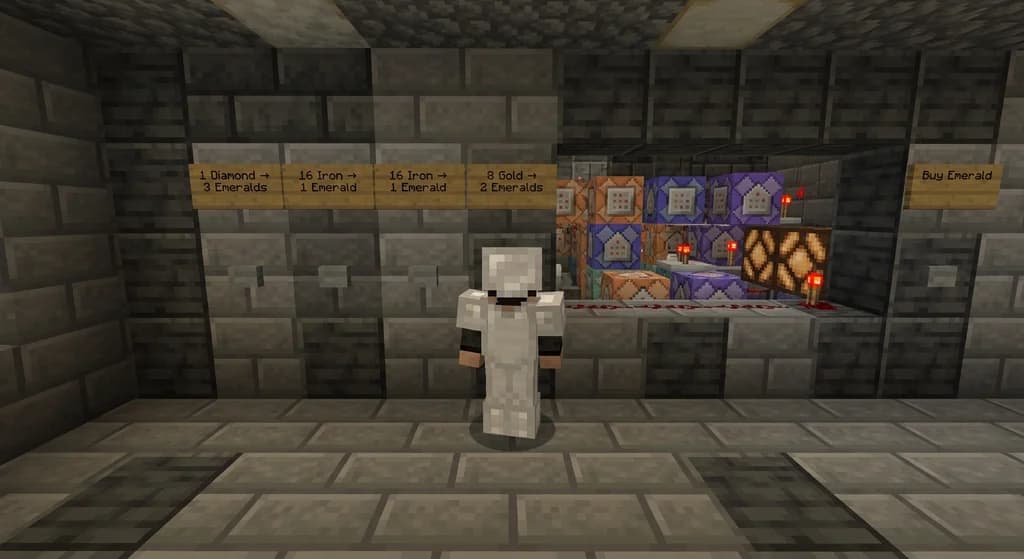
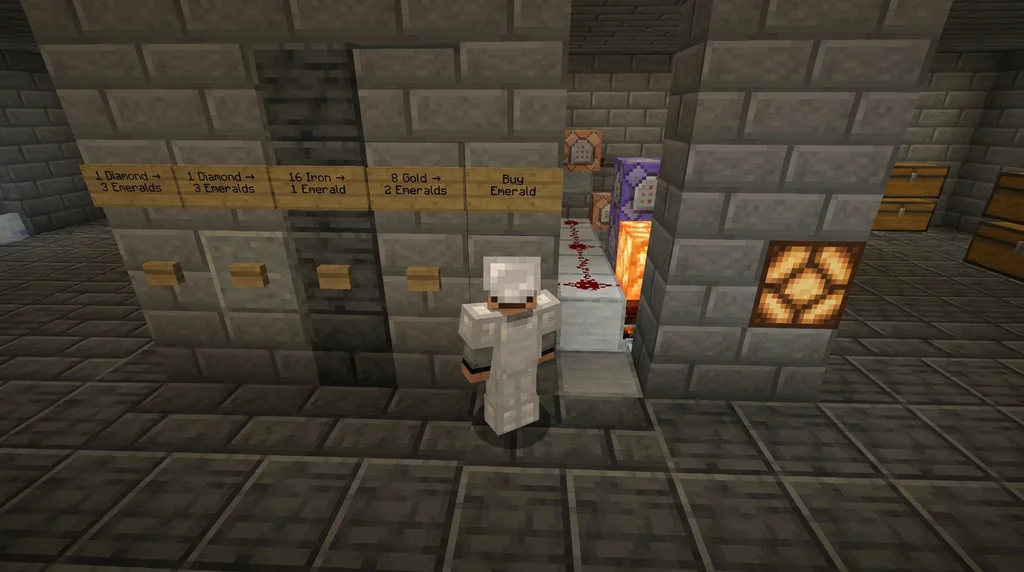
Construct a small room (3x3 or 3x4) with a wall where players will press buttons. Place signs on the wall listing each exchange option, e.g.,
- "1 Diamond → 3 Emeralds"
- "16 Iron → 1 Emerald"
- "8 Gold → 2 Emeralds"
- "Buy Emerald for 1 Diamond"
Place a button next to each sign. Behind the wall, leave a 1-block-deep trench for command blocks and redstone.
3. Wire the Command Blocks
For each exchange option, you need a chain of command blocks. Example for "1 Diamond → 3 Emeralds":
-
Impulse command block (powered by the button):
clear @p diamond 0 1– this checks if the player has at least 1 diamond. Set it to "Conditional" mode and keep a redstone block powering it via a repeater or directly. Wait – theclearcommand also removes the item. We'll useclearwith a count of 0 to only check, or better: usetestforin an impulse block, buttestforis removed in newer versions. Instead, use a combination ofclearwith a count of 0 (which only checks and doesn't remove) in a chain.Simpler approach: Use an impulse command block with
clear @p diamond 0 1and set it to Unconditional. Then attach a chain command block that is conditional. If the player does not have the item, the chain is skipped.
For clarity, here is the exact sequence for one exchange (Java 1.13+):
- Block A (impulse, unconditional):
clear @p diamond 0 1(checks for 1 diamond, does not remove) - Block B (chain, conditional):
clear @p diamond 1(removes 1 diamond) - Block C (chain, conditional):
give @p emerald 3(gives 3 emeralds) - Block D (chain, conditional):
scoreboard players add @p Balance 3(adds 3 to balance, if you're tracking that)
Connect redstone from the button to Block A. Use a redstone block beside Block A to keep it powered as long as the button is pressed (or use a short pulse).
For reverse exchanges (e.g., 3 emeralds → 1 diamond), adjust the commands accordingly.
Bedrock Note: In Bedrock Edition, use
testfor @p [hasitem={item=emerald,quantity=3}]in a repeating command block, but for simplicity, use the sameclearmethod – it works identically.
4. Build All Exchange Options
Repeat the chain for each exchange option. You can share the last command block that performs the addition to the scoreboard if you want a single balance tracker. Create a separate chain for each button, each ending with a conditional chain block that adds to the scoreboard.
5. Final Touches
- Place a sign explaining the rules: "Press button, receive emeralds. Each transaction removes the item from your inventory."
- Light the room with redstone lamps or glowstone.
- If you want to collect the items into a chest, add hoppers behind each set of command blocks (but this is optional; the
clearcommand deletes the item). - Test every button before letting players use it.
How It Works (Simple Flow)
- Player approaches the exchange wall.
- They press the button labeled "1 Diamond → 3 Emeralds".
- Command block A checks if they have at least 1 diamond. If yes, the chain fires: removes the diamond, gives 3 emeralds, and updates their scoreboard balance.
- If the player doesn't have the required item, the chain stops (conditional block fails), so nothing happens.
The scoreboard balance is optional but lets you track transactions for leaderboards or later features.
Tips & Customization
- Custom Exchange Rates: Change the commands to any item and any quantity. For example, 1 Netherite Ingot → 32 Emeralds.
- Withdraw Only: If you want players to buy items with emeralds, reverse the chain: give item, take emeralds.
- Banking System: Combine this with a scoreboard-based bank (see our guide on setting up a server bank with player deposits) for full economy management.
- Security: Always use conditional chains to prevent exploits. Test thoroughly.
- Scalability: Build a larger room with multiple booths for different resource types (ores, mob drops, crops).
FAQ
Can this work in survival mode? Yes, as long as you have operator permissions to place command blocks. Once set up, any player can use the buttons.
Do command blocks need to be always loaded?
The exchange needs to be in a loaded chunk (e.g., near spawn or with a ticking area). In Java Edition, use /tickingarea add to keep the chunk loaded.
Can I track individual player balances across multiple exchanges?
Yes, the Balance scoreboard is global per player, so any exchange that adds or removes from it will work seamlessly.
Will this work on a server that uses plugins? Yes, command blocks operate independently of plugins. However, some plugins may interfere with inventory or scoreboard operations – test your setup.
How do I prevent players from spamming the button? Place a redstone repeater with a delay or use a hopper timer. Alternatively, add a cooldown command that resets after a few seconds.
Sources
- A player can trade with them using emeralds as currency — Villager
- Players often establish in-game economy by building shops to trade valuable resources like diamonds and enchanted items. — Multiplayer
Frequently Asked Questions
Can this work in survival mode?
Yes, as long as you have operator permissions to place command blocks. Once set up, any player can use the buttons to exchange resources.
Do command blocks need to be always loaded?
The exchange chunk must be loaded. Use a ticking area in Java Edition or ensure it is in the spawn chunks. Otherwise, the exchange won't process.
Can I track individual player balances across multiple exchanges?
Yes, the `Balance` scoreboard is global per player. Any exchange that modifies it will be reflected everywhere on the server.
Will this work with plugins?
Command blocks work independently of plugins, but some plugins may modify inventory or scoreboard behavior. Test your setup before deploying.
How do I prevent button spam?
Add a short redstone repeater delay or a hopper timer between the button and the first command block. A cooldown of 1–2 seconds is usually enough.
Related guides
Minecraft Economy 101: How Supply and Demand Work on Player-Driven Servers
Learn how supply and demand shape Minecraft economies, from vanilla villager trading mechanics to player-driven server markets. Includes inflation control...
Piglin Bartering: Mechanics and Rewards
Learn the exact mechanics of piglin bartering in Minecraft Java and Bedrock. Includes cycle times, barter rewards, Soul Speed odds, and tips for efficient trading.
How to Cure a Zombie Villager for Insane Trading Discounts in 2026
Master the art of curing zombie villagers for massive, permanent trading discounts in Minecraft 2026. Step-by-step guide, trading hall designs, and...
How to Profit from Minecraft Wandering Trader Deals in 2026
Learn how to profit from Minecraft wandering trader deals in 2026. Discover the best trades, trapping techniques, and server economy strategies to earn...
Have a question or another approach?
Compare notes with other readers. Include your edition and version when discussing mechanics.