Why mobs despawn in Minecraft: mechanics, fixes, and pro tips
Filed under Minecraft Tips & Tricks · How we create content

TL;DR:
- Minecraft despawning follows distance-based rules: mobs vanish instantly beyond 128 blocks and probabilistically between 32 and 128 blocks; naming mobs or applying persistence tags prevents despawning altogether. Despawning primarily manages server performance by removing inactive or distant entities, which helps maintain gameplay smoothness and limits entity overload. To prevent unintended mob loss, players should name mobs, stay within 32 blocks during interactions, and ensure appropriate chunk and simulation distances are set.
You log back into your world after a short AFK break, run to your mob pen, and find it completely empty. No zombies, no skeletons, not even the creeper you were saving for a screenshot. It feels like a bug. We've heard this exact story from dozens of players on our SMP server, and almost every time, the culprit isn't a glitch at all. It's despawning, and once you understand how this system actually works, you'll never lose a prized mob to it again. This guide breaks down the full despawn mechanic, from distance rules to persistence tags, so you can build smarter and farm more confidently.
Table of Contents
- How mob despawning works: The core rules
- Why the game removes mobs: The deeper reason
- Proximity, persistence, and simulation distance: What matters most
- Troubleshooting and preventing unexpected despawns
- Why despawning isn't a glitch: The real survival skill
- Take your mob mastery further
- Frequently asked questions
Key Takeaways
| Point | Details |
|---|---|
| Distance matters most | Mobs more than 128 blocks from all players will despawn instantly. |
| Inactivity triggers probability | Between 32 and 128 blocks, mobs despawn randomly after being inactive for 30 seconds. |
| Persistence stops despawning | Named mobs or those with persistence tags are safe from normal despawn rules. |
| Simulation distance is key | On Bedrock edition, simulation distance determines if despawn checks even happen. |
| Prevention is possible | Careful use of proximity, name tags, and settings can prevent accidental mob loss. |
How mob despawning works: The core rules
Now that we've acknowledged mob vanishing isn't random, let's uncover the concrete rules that drive it. Despawning is a deliberate game mechanic, and it follows specific distance-based logic that applies to nearly every hostile and passive mob in the game.
The most important number to know is 128 blocks. Mobs despawn instantly when they are more than 128 blocks away from all players currently in the world. This isn't a delayed process or a slow fade. The moment you cross that threshold, the game removes the mob from memory almost immediately. This rule applies regardless of the time of day, the biome, or what the mob is doing. If no player is within 128 blocks, it's gone.
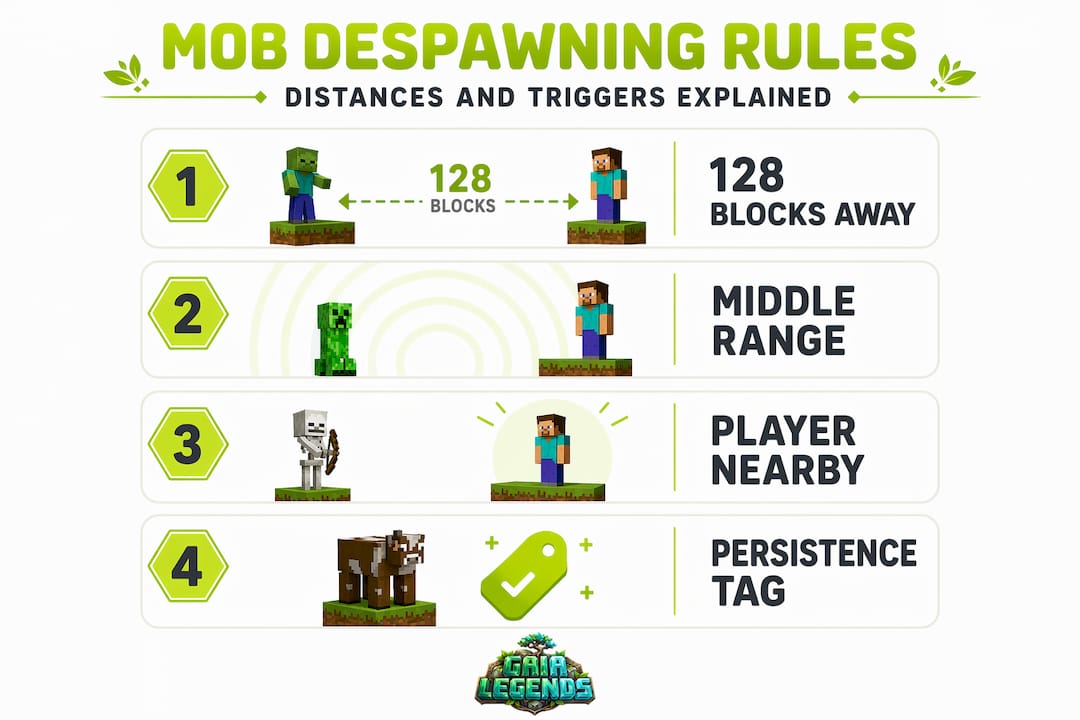
The second zone to understand is the middle range, which sits between 32 and 128 blocks from the nearest player. Despawning becomes probabilistic in this band, meaning it doesn't happen instantly but starts becoming possible after a period of mob inactivity. The game rolls a random chance every few seconds. The longer a mob sits in this zone without interacting with a player, the more likely it is to vanish. This explains why you might lose a mob even when you're "close" but not quite close enough.
Bedrock Edition players often wonder if the rules are the same. They're very similar. The Bedrock despawn component uses the same min and max distance parameters (32 and 128 blocks), plus the same inactivity timing and random chance logic as Java. The core framework is the same, though Bedrock adds simulation distance as an additional layer we'll cover later.
Here's a quick reference table to keep these zones straight:
| Zone | Distance from player | Despawn behavior |
|---|---|---|
| Safe zone | 0 to 32 blocks | No despawning occurs |
| Probabilistic zone | 32 to 128 blocks | Random chance over time |
| Instant despawn zone | Beyond 128 blocks | Despawns almost immediately |
| Fish-specific zone | Beyond 40 blocks | Always despawns (special rule) |
A few extra facts worth knowing:
- Mobs in boats, minecarts, or on leashes are not automatically protected from despawning unless they are also persistent.
- Baby animals and some passive mobs have different rules than hostile mobs, so always verify behavior for specific mob types and behaviors.
- Named mobs (via name tags) become persistent and bypass these distance checks entirely.
- Mobs with custom persistence set by commands also skip the distance checks.
Pro Tip: Many players focus only on distance and ignore inactivity timers. A mob sitting in the 32 to 128 block band but doing nothing will despawn much faster than one that is actively pathfinding or reacting to the environment. Keep your mobs engaged or keep them named.
Understanding these numbers gives you a huge advantage when designing farms, mob zoos, or anything that relies on mobs being where you left them. Once you know the rules, you can design around them intentionally. Pair this with solid mob spawning strategies and you'll have consistent, reliable mob control in any build.
Why the game removes mobs: The deeper reason

Keeping entity counts manageable is exactly why despawning exists. The game removes mobs that no player is actively engaging with, essentially saying "no one is watching this entity, so there's no need to keep simulating it." This is smart resource management baked into the game engine. Without it, every mob that ever spawned since your world was created would still be alive somewhere, eating memory and slowing everything down.
Here are the key scenarios where despawning actively protects your game:
- Entity overload situations: If you AFK for hours near a dark spawning area without any mob caps being hit, you'd slowly accumulate thousands of mobs. Despawning keeps the cap functional and the world playable.
- AFK farms: Mob grinders rely on controlled spawning. Without despawning, mobs that wandered out of your kill chamber would stack up endlessly in nearby caves and hallways.
- Adventure maps and custom worlds: Map makers count on despawning to reset certain mob-based encounters without needing complex command sequences. It's a built-in reset tool.
- Multiplayer servers: On any server with multiple players exploring different areas, despawning prevents distant, unobserved areas from accumulating entity lag that affects everyone.
Think of despawning as the game's way of staying lean and focused. It only simulates what matters to active players, which is genuinely clever game design. If you've ever used spawning and despawn control tricks on a busy server, you already know how much smoother things run when entity counts stay low.
And for players who love displaying mobs creatively in builds, like in interactive mob museums, knowing this context helps you plan your exhibits properly, because every display mob needs a name tag or it simply won't stay put.
Proximity, persistence, and simulation distance: What matters most
Now that we see why mobs are removed, let's break down the key settings and tags that give you the most control. Three factors determine whether your mob sticks around: how close you are to it, whether it has persistence, and (on Bedrock) what your simulation distance is set to.
Persistence is the most powerful tool at your disposal. Mobs with persistence do not despawn under normal circumstances, regardless of distance. Persistence is applied when you name a mob with a name tag, spawn a mob with a command, or when a mob picks up an item (a zombie that picks up your sword, for example, gains persistence automatically). Once a mob is persistent, it ignores every distance rule we've discussed. It stays until it dies or gets removed by a command.

Simulation distance is a setting that matters especially for Bedrock players. On Bedrock, this controls how far from the player the game actually runs entity AI and despawn checks. If a mob is outside your simulation distance, the game doesn't process it at all, meaning despawn checks don't even run for it. This sounds like a safety net, but it also means mobs outside simulation distance don't move, breed, or do anything useful. Despawn checks run relative to player proximity, so moving away from an area or changing simulation distance settings can trigger despawning for unprotected mobs.
Here's a comparison of how different mob types handle despawning:
| Mob type | Despawn behavior | Notes |
|---|---|---|
| Standard hostile mobs | Despawn beyond 128 blocks | Probabilistic between 32 to 128 blocks |
| Persistent mobs (named) | Never despawn normally | Applies to name-tagged or command-spawned mobs |
| Fish (cod, salmon, etc.) | Despawn beyond 40 blocks | Much shorter range than standard mobs |
| Passive mobs (cows, pigs) | Follow standard rules | Can despawn if not persistent |
| Bosses (Wither, Ender Dragon) | Do not despawn | Hardcoded persistence |
To check whether your area is actually loaded and simulated correctly, follow these steps:
- Press F3 (Java) or check entity debug info (Bedrock) to see chunk loading status.
- Confirm your render distance and simulation distance are set high enough to include your mob area.
- Stand within 32 blocks of your mob and watch it for a full Minecraft day to verify it stays loaded.
- If using a farm, place a test mob in the intended location and step back to 33 blocks, then check after 10 real minutes.
- Use the "/data get entity` command in Java to confirm whether a specific mob has the NoAI or persistence tag set.
You can also apply commands to set mob persistence directly in Java using /data merge entity @e[type=zombie,limit=1] {PersistenceRequired:1b}, which forces the mob to act as if it were named without needing a name tag item.
Pro Tip: Chunk loading and mob persistence interact in subtle ways. A named mob in an unloaded chunk won't despawn, but it also won't do anything. If you want your farm mobs to stay active and present, you need both persistence AND a loaded chunk. Consider using a chunk loader design or staying within render distance of your farm when it's running.
For players who really want to go deep on how mobs navigate their space, understanding mob pathfinding and chunk loading is the natural next step. Movement, chunk loading, and despawn rules are tightly connected, and knowing all three makes you a genuinely advanced player.
Troubleshooting and preventing unexpected despawns
Now, let's put the rules and reasoning into action with a troubleshooting toolkit every player can use. Even experienced players sometimes lose mobs they didn't expect to lose. Here's how to figure out what went wrong and make sure it doesn't happen again.
128 blocks is your despawn threshold. Any mob beyond that distance from every player in the world will vanish almost instantly, no matter what it's doing or how long it's been there.
When you're trying to figure out why a specific mob disappeared, work through this checklist:
- Was the mob named? If not, it had no persistence and was always at risk. Check whether you left it unnamed by mistake.
- Were you within 32 blocks? If you were in the 32 to 128 block band, the mob was in the probabilistic despawn zone and could have vanished over time.
- Is the area loaded/simulated? On Bedrock especially, if you went too far away or adjusted simulation distance, the mob may have been removed when its chunk became unloaded.
- Did the mob get killed? A mob that a wandering player, another mob, or environmental damage killed isn't technically a despawn. Check for drops.
- Was a command or mod involved? Plugins on servers or certain mods can clear entities, sometimes silently. Ask your server admin about entity-clearing schedules.
- Did the mob fall through the world or suffocate? Some mobs can die in terrain, especially after updates change block positions.
When troubleshooting random despawns, the most important edge cases to check are whether the mob was named or persistent, whether you were outside the 32-block safe radius, and whether the chunk was actively simulated. These three factors account for the vast majority of "mysterious" disappearances.
Here are the top preventive habits every survival player and farm builder should build:
- Always name tag mobs you care about. This is the single most reliable despawn prevention method in the game. One name tag, and your mob is safe indefinitely.
- Stay within 32 blocks during critical moments. If you're loading mobs into a farm or moving them somewhere new, stay close until they're secured.
- Set simulation distance appropriately on Bedrock. Don't run on minimal settings if you're managing a farm, because your mobs may be sitting outside the simulation range without you realizing it.
- Use mob troubleshooting tips from our mob types guide to verify behaviors specific to your mob type.
- Build farms within reasonable distance of your base. The farther away your farm is, the more care you need to ensure it stays loaded when you're operating it.
- For boss mobs and persistence: bosses like the Wither and Ender Dragon have hardcoded persistence and will never despawn mid-fight, but summoned versions in custom arenas are a different story depending on your server setup.
Pro Tip: Build a simple 5x5 holding pen with name tag dispensers attached to a button near your mob collection area. Every time you bring in a new mob, tag it before doing anything else. This single habit will save you countless frustrations, especially in the early and mid-game when name tags feel expensive.
Despawn prevention isn't complicated once you have the right habits in place. The 128-block rule is your biggest enemy, and name tags are your most reliable ally. Everything else is just understanding the edge cases.
Why despawning isn't a glitch: The real survival skill
Having learned the practical steps, let's challenge the common view that despawning is just an annoyance. Here's our honest take: we think despawning is one of the most misunderstood mechanics in Minecraft, and the players who complain most about it are usually the ones who haven't learned it yet.
Every time someone on our SMP server posts in chat that "the game is broken" because their mobs are gone, what they're really describing is a knowledge gap, not a game flaw. Despawning works exactly as designed. It has worked this way for years. And the players who understand it don't just stop losing mobs; they start designing their entire builds and farms around these rules in ways that are genuinely more creative and effective.
Think about what happens when you actually master this system. You stop placing mobs carelessly. You start thinking in zones. You plan your afk spots, your farm dimensions, and your mob display areas all with the 32 and 128 block rules in mind. You use name tags strategically, like a limited resource with real value, rather than as a last resort. This kind of intentional thinking is exactly what separates a casual builder from someone who can design a world-class mob farm or a fully functional mob exhibit that never breaks.
There's also a bigger point here. Most accidental despawns aren't caused by bad game design. They're caused by players not knowing the rules and then blaming the outcome on randomness. That's a very human thing to do, but it doesn't fix the problem. Taking the time to learn advanced mob control actually gives you creative freedom rather than limiting it, because you're working with the game instead of against it.
We genuinely believe despawning teaches players to value what they have. A mob with a name tag feels different. It feels earned. And that sense of investment makes you a more careful, thoughtful player overall. The frustration of losing a mob is real, but it almost always leads to better habits, which makes you stronger in the long run.
Take your mob mastery further
With a new understanding of despawning, you might want to deepen your skills further. Here's where to start.

Despawn logic is just one piece of a much larger puzzle. Once you've got your mobs staying put, the next step is optimizing how they spawn, how they behave, and how you use them in your builds and automation. At Gaia Legends, we publish detailed guides every single day covering exactly these topics, from mob farm design to server-side entity management. Whether you're running a solo survival world or managing a busy SMP, our guides are built from real server experience with 200 active players putting these mechanics to the test. Visit Gaia Legends Minecraft guides to explore the full library, and start with our deep-dive on master mob spawning to take your mob control to the next level.
Frequently asked questions
Why do my named mobs still despawn sometimes?
Named mobs with a name tag should not despawn under normal circumstances, but unusual technical issues, entity-clearing plugins on servers, or certain mods may override this behavior and remove them anyway.
How can I keep mobs from despawning in my farm?
Stay within 32 blocks of your mobs during operation, use name tags to apply persistence, and check simulation distance settings if you're playing on Bedrock edition, since this setting restricts which mobs are even evaluated for despawn.
Do mobs despawn in unloaded chunks?
Mobs cannot despawn in an unloaded chunk because despawn checks require player proximity and only run when the chunk is actively loaded and simulated.
Does simulation distance affect despawning on Java edition?
No, simulation distance only restricts despawn rules in Bedrock edition. Java edition uses render distance and chunk loading to determine which mobs are actively simulated.
Which mobs have different despawning rules?
Fish always despawn beyond 40 blocks regardless of other conditions, while named or persistent mobs skip despawn checks entirely. Boss mobs like the Wither and Ender Dragon have hardcoded persistence and never despawn mid-encounter.
Recommended
Related guides

How to Obtain Mending in Minecraft
Learn how to get Mending in Minecraft. Discover the best methods: trading with librarian villagers, fishing, and looting chests. Includes mechanics and...

How to Use the Trident in Minecraft: Riptide, Channeling & Impaling
Learn how to use the trident in Minecraft with our quick reference guide. Covers Riptide, Channeling, Impaling enchantments, throwing mechanics, and...
How to Find Buried Treasure in Minecraft 2026: Maps & Tips
Master how to find buried treasure in Minecraft with our 2026 guide. Find treasure maps in shipwrecks & ruins, follow the X, and collect rare loot like...

Minecraft Combat Tips That Win Every Fight in 2026
Master Minecraft combat tips to dominate every fight in 2026! Learn essential strategies for weapons, timing, and terrain to become unbeatable.
Have a question or another approach?
Compare notes with other readers. Include your edition and version when discussing mechanics.