How to Use the Minecraft Crafter: Automatic Crafting Guide (2026)
Filed under Minecraft Tips & Tricks · How we create content
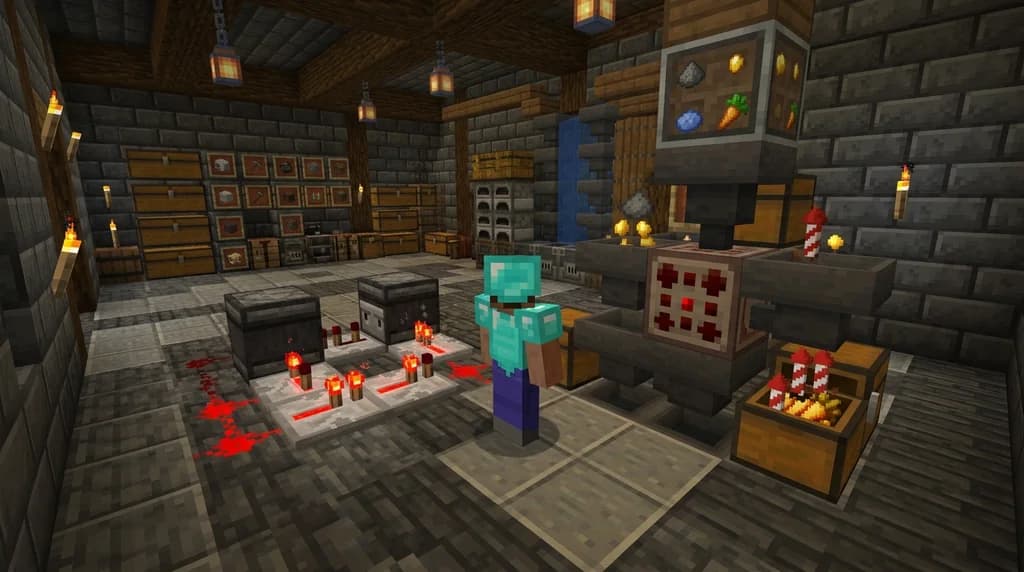
Key Takeaways
| Point | Details |
|---|---|
| Crafter Fundamentals | The crafter uses a 3x3 grid and redstone to craft items automatically; lock slots to prevent wrong ingredients. |
| Redstone Control | A comparator reading indicates how many slots are filled, enabling precise batch crafting. |
| Efficient Recipes | Automate high-volume items like fireworks, golden carrots, and iron blocks to save hours of manual crafting. |
| SMP Impact | On multiplayer servers, automatic crafting redefines the economy by enabling mass production and player shops. |
| Gaia Advantage | On Gaia Legends, use crafters to generate trade goods, earn server currency, and support community projects. |
Table of Contents
- What Is the Minecraft Crafter?
- How to Craft and Place the Crafter Block
- How Does Automatic Crafting with the Crafter Work?
- How to Set Up Your First Automatic Crafter
- Best Uses for the Minecraft Crafter
- Tips for Advanced Crafter Setups
- Why Is the Crafter a Game-Changer for SMP Servers?
- How to Put This Into Practice on Gaia Legends
- Conclusion
- Recommended
Learning how to use the Minecraft crafter is one of the most valuable skills you can pick up in the 1.21 update. This new redstone-powered block takes the drudgery out of repetitive crafting, letting you automate everything from arrows to armor. Whether you’re a veteran redstoner or new to automation, this guide will walk you through every mechanic, wiring trick, and real-server application. By the end, you’ll have a working automatic crafting setup and a clear idea of why the crafter is already reshaping multiplayer survival.
What Is the Minecraft Crafter?
The Minecraft Crafter is a redstone-driven utility block added in Minecraft 1.21 that automatically crafts items when supplied with materials and a redstone pulse, effectively turning manual crafting into a set-and-forget operation.
The crafter uses a 3x3 grid and can store up to nine different item stacks at once, discharging each crafted item into an adjacent container with every redstone pulse (via Minecraft Wiki). Unlike the crafting table, you don’t need a player interface—once you set the recipe and lock the slots, the crafter works on its own.
Crafter recipes are locked by disabling slots with left-click, preventing unwanted items from entering those slots during automatic crafting (via Minecraft Wiki). This locking mechanism is essential for reliable automation.
The crafter also interacts with hoppers for input and output, and comparators can read how many slots are filled. Similar to how the bundle revolutionizes inventory management, the crafter transforms production (learn more about bundles in our guide to the Minecraft bundle).
How to Craft and Place the Crafter Block
You craft the crafter using five iron ingots, a crafting table, two redstone dust, and a dropper, then place it like any other block where you need on-demand crafting.
The recipe fills the 3x3 grid as follows:
- Top row: iron ingot, crafting table, iron ingot
- Middle row: iron ingot, dropper, iron ingot
- Bottom row: redstone dust, redstone dust, redstone dust
Once placed, the crafter faces the direction you’re looking, with the front side distinguishable by a small crafting table icon. You can rotate it by right‑clicking with an empty hand while sneaking.
Warning: The crafter requires a redstone pulse to function; placing it without any power source will leave it inert. Always test with a button or lever before building complex clock circuits.
How Does Automatic Crafting with the Crafter Work?
Automatic crafting with the crafter works by locking the recipe into the grid, then sending a redstone signal each time you want to produce one output stack.
The process is straightforward but elegant:
- Configure the recipe by placing ingredients in the crafter’s grid and disabling any unused slots.
- Connect a redstone source—anything from a button to a full clock.
- Supply ingredients through a hopper on top and collect outputs from a hopper below.
- Monitor the craft progress with a comparator: a comparator placed next to a crafter outputs a signal strength between 0 and 9, corresponding to the number of non-empty slots, allowing precise control over batch crafting (via Minecraft Wiki).
Each redstone pulse triggers one craft operation, and because it can respond to pulses as short as 1 game tick, a single crafter can theoretically craft up to 20 items per second (via Minecraft Wiki). This speed makes ramping up production trivial.
This comparator behavior is key for complex circuits, much like the redstone logic in villager‑based crop farms.
How to Set Up Your First Automatic Crafter
Setting up your first automatic crafter starts with a simple redstone clock and a hopper chain to feed ingredients and collect results.
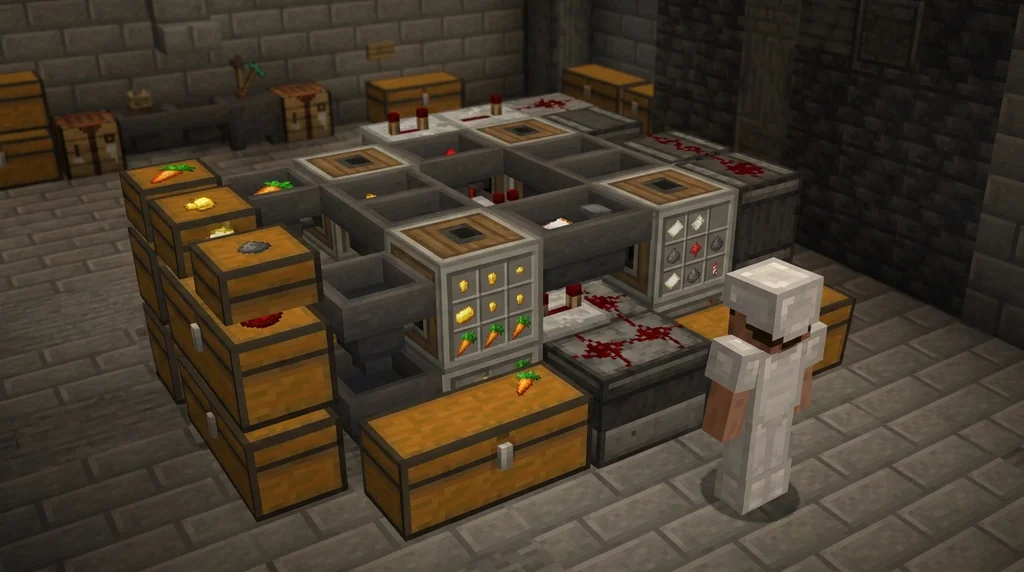
Follow these steps to build a basic eternal firework rocket factory:
Step-by-Step
- Place the crafter and a hopper on top (pointing into the crafter) and another hopper underneath (from the crafter to a chest).
- Set the recipe. For rockets, put gunpowder and paper in the 3×3. Left‑click the empty slots to disable them, so only gunpowder and paper get used.
- Power it manually. Connect a button to the crafter and press it—you should see a firework rocket appear in the bottom hopper’s inventory.
- Replace the button with a redstone clock. A simple observer clock (observer watching a powered rail with a detector rail below) fires every 0.2 seconds, yielding 5 rockets per second. Adjust the pulse rate to match your ingredient supply.
- Add a comparator loopback. When the output chest fills up, you want to pause crafting. Place a comparator behind the crafter and run redstone to a sticky piston that breaks the clock circuit when signal ≥ 8 (meaning 8 slots are occupied).
Pro Tip: Use a sticky piston and an observer to build a toggle that stops crafting when you have enough items. This prevents overproduction and hopper clogging.
This clock design shares principles with the dosing systems used in cauldron redstone builds.
Best Uses for the Minecraft Crafter
The crafter shines when you automate high‑frequency recipes like fireworks for elytra flight, golden carrots for villager trading, or dispensers for advanced redstone contraptions.
Here’s a quick comparison of manual vs automated crafting for a few essential items:
| Recipe | Manual Time per Stack | Automated Rate |
|---|---|---|
| Firework Rockets | ~2 min per 3 stacks | up to 20 rockets/s* |
| Golden Carrots | 30 sec per stack | 1 stack/s |
| Iron Blocks | 1 min per stack | 9 ingots converted/s |
*Rate depends on clock speed; practical setups run at 5–10 rockets/s.
Automating firework production alone makes elytra travel truly sustainable, as we cover in our elytra flight masterclass. Combined with an automated horse breeding setup (see our horse breeding guide), you can mass‑produce saddles and horse armor from ingots and leather, turning your base into a gear factory.
Other top picks for crafter automation include bread from wheat (for villager breeding), bone meal from bones, and shulker boxes for massive storage systems.
Tips for Advanced Crafter Setups
Once you master the basics, you can chain multiple crafters together, integrate them with item sorters, and even build fully self‑contained factories that craft and store finished products without player intervention.
- Multi‑crafter arrays: Use water streams and droppers to distribute ingredients evenly among up to 16 crafters all working on the same recipe.
- Item filters: Employ locked slots in each crafter to avoid recipe contamination.
- Fullness detection: Monitor output chests with comparators and shut down the clock when storage is full to reduce lag.
- Overflow protection: Always route outputs through a hopper line into a double chest; never let items drop on the ground.
Warning: Untended automatic crafting arrays can cause massive entity buildup if items spill onto the floor. Always use a hopper line or water stream to collect outputs into a double chest with overflow protection.
Why Is the Crafter a Game-Changer for SMP Servers?
On multiplayer servers, the crafter shifts the economy from manual labor to industrial‑scale production, enabling player shops, public supply depots, and server‑wide projects that would be impossible to sustain with hand crafting.
In a typical survival world, every player must spend hours on repetitive tasks—smelting ores, crafting tools, making torches. The crafter abolishes that grind. Communities can now build centralized production hubs: one area for food, another for building blocks, a third for weaponry. This specialization mirrors real‑world economies and encourages trade.
For example, a public wood‑processing factory on your SMP can automatically convert logs to sticks and planks, saving every builder in the spawn chunks from endless inventory management. Player shops can sell fully automated outputs, creating in‑game wealth and a vibrant marketplace.
How to Put This Into Practice on Gaia Legends
On Gaia Legends, all the crafter knowledge you’ve gained translates directly into server‑wide advantages. Set up your own automatic crafter array to mass‑produce items that are always in demand—think rockets, golden carrots, and TNT—and sell them through the player‑run economy. Use the community supply depots to share resources and help new players get started.
Gaia Legends rewards ingenuity: you can earn server currency by trading bulk goods, and the claim system protects your factories from griefing. The server is free to join, non‑pay‑to‑win, and supports Java & Bedrock crossplay, so you can bring friends from any platform.
Join at gaialegends.pro and start your legend today.
Conclusion
The Minecraft crafter levels up your redstone game and turns survival into a builder’s paradise. To recap the three most important lessons:
- Lock your crafter slots and use comparator feedback for precise control.
- Start with high‑impact recipes like fireworks and golden carrots to save the most time.
- On a server like Gaia Legends, automation isn’t just a convenience—it’s a path to wealth and community prestige.
Now grab your iron, dust off that dropper, and build something awesome.
Recommended
- How to Trade Unwanted Custom Items for Server Currency in Minecraft 2026 | Gaia Legends
- How to Start a Player-Run Newspaper in Your Minecraft Community (2026) | Gaia Legends
- 7 Best Pastel Block Palettes for Cute Minecraft Builds (2026) | Gaia Legends
- How to Use the Trident for Boss Hunting in Minecraft 2026 | Gaia Legends
Ready to play? Join Gaia Legends today — no pay-to-win, Java + Bedrock crossplay.
- Java:
join.gaialegends.pro - Bedrock:
join.gaialegends.pro— Port19132
Further reading
These references were recorded with the article; specific claims have not been matched to source excerpts.
Frequently Asked Questions
How do I use the Minecraft crafter?
You use the Minecraft crafter by placing it, setting a recipe in its 3x3 grid, and powering it with a redstone pulse. Disable unused slots by left-clicking, then feed ingredients in via a hopper and collect outputs from below. Each pulse crafts one item. For continuous automation, connect a redstone clock or observer circuit to trigger it repeatedly.
Can the crafter be automated with hoppers?
Absolutely. Hoppers can feed ingredients into the crafter from any side except the bottom, and a hopper below collects the crafted output. You can chain multiple hoppers to supply different ingredients and even use water streams to distribute items evenly among several crafters.
What is the best redstone clock for the crafter?
The observer clock is popular because it’s compact and adjustable: two observers facing each other create a rapid pulse, while a single observer watching a powered rail gives a slightly slower, controllable signal. For bulk production, a simple hopper clock offers easy speed control.
How do you lock slots in the crafter?
To lock a slot, open the crafter’s interface and click on the empty slot you want to disable. A small padlock icon appears. This prevents any item from entering that slot during automatic crafting, which is crucial for recipes that don’t use all nine spaces.
Can the crafter craft anything?
The crafter can craft any item that has a vanilla recipe, but it cannot craft shapeless recipes where the arrangement doesn’t matter unless you account for ingredient order. It also cannot craft items that require a specific tool, like shears for honeycomb, because the crafter doesn’t simulate player actions.
Does the crafter work on all game editions?
Yes, the crafter is available in both Java Edition and Bedrock Edition starting from version 1.21. Mechanics are identical across platforms, so any tutorial you follow will translate directly to your game. Just make sure your server or realm is updated to the latest version.
Related guides
How to Use Wind Charges in Minecraft 1.21: A Complete Movement Guide
Master how to use wind charges in Minecraft 1.21. Learn wind charge movement tricks, knockback mechanics, and survival uses on Gaia Legends SMP.
How to Conquer Trial Chambers in Minecraft 2026: Tips & Tricks
Master trial chambers with our in-depth Minecraft guide. Learn how to find chambers, defeat breezes, loot vaults, and get the best gear. Tips for 2026 and...
How to Breed Horses in Minecraft 2026: Speed, Color & Jump Guide
Learn how to breed horses in Minecraft 2026 with this complete guide. Master speed, jump, and color genetics, plus tips for superior mounts on SMP servers.
How to Find Diamonds Fast in 2026: The Ultimate Mining Guide
Learn how to find diamonds fast in Minecraft 1.21 with the best Y-level, strip mining layouts, and pro tips that maximize every diamond ore vein you...
Have a question or another approach?
Compare notes with other readers. Include your edition and version when discussing mechanics.