# How to Build a Vanilla Minecraft Shop with Scoreboard Economy (2026)
Canonical: https://guides.gaialegends.pro/posts/minecraft-scoreboard-economy-shop
Published: 2026-08-02
Updated: 2026-08-02
> You don't need mods or plugins to run a player shop. A vanilla Minecraft scoreboard economy shop uses /scoreboard to track virtual currency and command blocks to handle transactions. This guide covers creating a currency, building buy and sell shops, security best practices, and integrating your shop into a wider player economy—all without a single mod.
You don't need mods or plugins to run a player shop. A vanilla Minecraft scoreboard economy shop uses /scoreboard to track virtual currency and command blocks to handle transactions. This guide covers creating a currency, building buy and sell shops, security best practices, and integrating your shop into a wider player economy—all without a single mod.
## Key Takeaways
| Point | Details |
| --- | --- |
| Currency creation | Use /scoreboard objectives add with dummy criterion to make a virtual currency like Coins. |
| Shop mechanics | A buy shop uses a button and command blocks to deduct coins and give items; a sell shop uses a chest and comparator. |
| Security first | Always set chain command blocks to Conditional to prevent free items, and restrict command block access to ops. |
| Economy integration | Link your shop to server job systems and price items based on supply and demand for a thriving market. |
| Vanilla power | No mods required—scoreboard shops work on any server with command blocks enabled, including crossplay SMPs. |
## Table of Contents
- [What Is a Scoreboard Economy Shop?](#what-is-a-scoreboard-economy-shop)
- [How to Set Up a Scoreboard Currency System](#how-to-set-up-a-scoreboard-currency-system)
- [How to Build a Basic Shop with Command Blocks](#how-to-build-a-basic-shop-with-command-blocks)
- [What Commands Do You Need for a Vanilla Shop?](#what-commands-do-you-need-for-a-vanilla-shop)
- [How to Add Security and Anti-Griefing to Your Shop](#how-to-add-security-and-anti-griefing-to-your-shop)
- [How to Integrate Your Shop with a Player Economy](#how-to-integrate-your-shop-with-a-player-economy)
- [How to Put This Into Practice on Gaia Legends](#how-to-put-this-into-practice-on-gaia-legends)
- [Conclusion](#conclusion)
- [Frequently Asked Questions](#frequently-asked-questions)
- [Recommended](#recommended)
You don't need mods or plugins to run a player-run shop on your Minecraft server. A vanilla **minecraft scoreboard economy shop** uses command blocks and scoreboard objectives to let players buy and sell items with virtual currency. This guide walks you through setting up a complete shop system in vanilla Minecraft 1.21+ that works on any server, including SMPs like [Gaia Legends](https://gaialegends.pro). Whether you're building a diamond-for-coins exchange or a full marketplace, you'll learn the commands, redstone logic, and security tips to make it happen.
## What Is a Scoreboard Economy Shop?
**A scoreboard economy shop is a vanilla Minecraft system that uses the /scoreboard command to track virtual currency and command blocks to process transactions, enabling player-to-player trading without mods.**
A scoreboard economy replaces physical emeralds or diamonds with a digital balance stored as a score for each player. Shops are built using chests, comparators, and command blocks that check a player's score, deduct the price, and give the item. This method is completely vanilla and works on any server that allows command blocks. Unlike villager trading or barter economies, scoreboard shops can be automated, scaled across multiple locations, and integrated with job systems.
Here's a quick comparison of economy models:
| Economy Type | Currency | Automation | Mods Required | Best For |
|--------------|----------|------------|---------------|----------|
| Scoreboard Shop | Virtual (score) | Fully automatable | None | Large player markets, custom currencies |
| Villager Trading | Emeralds | Semi-automated with machines | None | Single-player or small SMPs |
| Barter Economy | Items | Manual | None | Casual servers, roleplay |
| Plugin Economy | Virtual (via plugins) | Fully automated | Yes (e.g., Vault) | Modded servers, complex economies |
Scoreboard shops shine when you want a custom currency name (like "Coins" or "Gems") and a system that can be expanded with quests and jobs. For more on villager-based trading, check out our guide on [auto villager trading machines](/posts/auto-villager-trading-machine-minecraft-2026).
## How to Set Up a Scoreboard Currency System
**Setting up a currency system starts with creating a scoreboard objective that acts as a wallet, assigning each player a numerical balance that can be increased or decreased via commands.**
First, decide on a currency name. This will appear on scoreboards and in chat. For this guide, we'll use "Coins". Run this command in chat (with operator permissions):
```
/scoreboard objectives add Coins dummy "Coins"
```
The `dummy` criterion means the score only changes via commands, not game events. You can use `dummy` for any custom currency. A scoreboard objective name can be up to 16 characters long and its value can reach 2,147,483,647 (via [Minecraft Wiki](https://minecraft.wiki/w/Scoreboard)). That's more than enough for any economy.
To give a player starting coins, use:
```
/scoreboard players add @p Coins 100
```
To check a player's balance, they can run `/trigger` or you can display it on the sidebar with `/scoreboard objectives setdisplay sidebar Coins`. But for shop transactions, we'll use command blocks that read and modify these scores.
> **Pro Tip:** Create a "Bank" scoreboard objective for savings if you want to add interest later, using `/scoreboard players operation` to transfer between Coins and Bank.
## How to Build a Basic Shop with Command Blocks
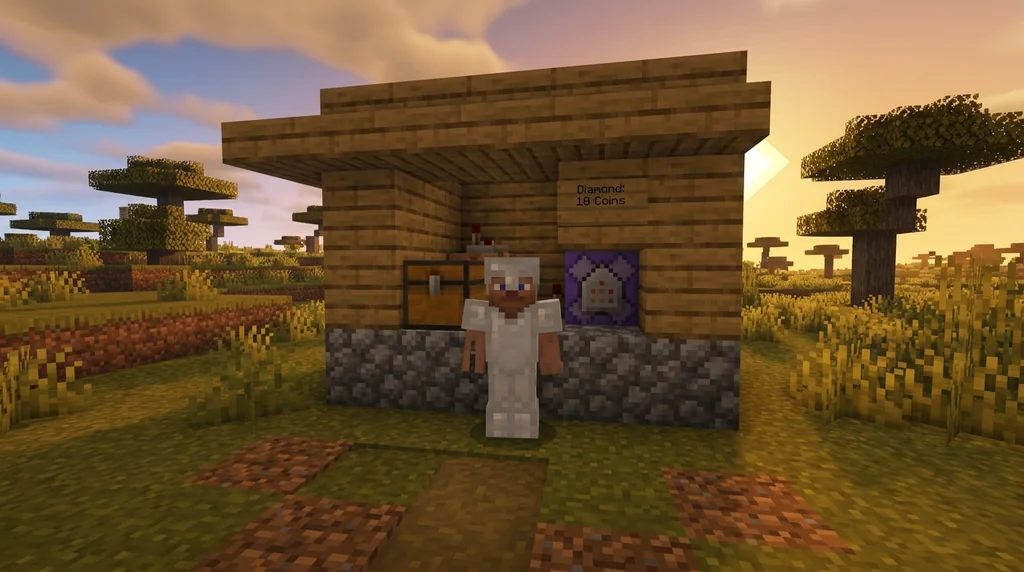
**A basic shop uses a chest as an input for sell orders or a button for buy orders, with command blocks that modify scoreboard balances and give or take items.**
### Building a Sell Shop (Item → Coins)
Place a chest where players deposit the item they want to sell. Behind it, place a redstone comparator pointing away from the chest. Connect the comparator to a redstone dust line leading to a command block. The comparator outputs a signal strength based on the number of items in the chest: a redstone comparator outputs a signal strength of 1 for every full stack of 64 items in a chest, up to 15 for 15 stacks (via [Minecraft Wiki](https://minecraft.wiki/w/Redstone_Comparator)). You can use this to price per item.
For a simple fixed-rate sell shop that buys diamonds for 10 Coins each:
1. Place an impulse command block (needs redstone) and set it to:
```
/execute as @p[distance=..5] run scoreboard players add @s Coins 10
```
2. Place a chain command block behind it, set to "Conditional" and "Always Active":
```
/execute as @p[distance=..5] run clear @s diamond 1
```
When a player stands near the chest and the comparator triggers (e.g., via a redstone clock or a button), the first command adds 10 Coins, and the conditional second command removes one diamond. If the player has no diamonds, the clear fails and the chain stops.
### Building a Buy Shop (Coins → Item)
For a shop that sells an item for coins, use a button instead of a chest. Wire a button to an impulse command block:
1. Impulse command block:
```
/execute as @p[distance=..3] if score @s Coins matches 10.. run scoreboard players remove @s Coins 10
```
2. Chain command block (conditional, always active):
```
/execute as @p[distance=..3] run give @s diamond 1
```
The `if score` check ensures the player has at least 10 Coins before deducting. Only if the deduction succeeds does the chain give the item.
## What Commands Do You Need for a Vanilla Shop?
**The core commands for a vanilla shop involve /scoreboard players to check and modify balances, /give to deliver items, and /execute to tie everything together.**
Here's a quick reference:
- `/scoreboard objectives add dummy` – Create a currency objective.
- `/scoreboard players add ` – Add coins.
- `/scoreboard players remove ` – Deduct coins.
- `/scoreboard players set ` – Set a specific balance.
- `/scoreboard players operation ` – Transfer or calculate scores. Using /scoreboard players operation allows you to transfer, add, or subtract scores between players, enabling multi-step transactions (via [Minecraft Wiki](https://minecraft.wiki/w/Commands/scoreboard)).
- `/execute as if score @s Coins matches run ...` – Conditional execution based on balance.
- `/give ` – Give the purchased item.
- `/clear ` – Remove the sold item.
For a buy shop, you'll chain these with conditional command blocks. For a sell shop, you'll need to detect items and add coins.
## How to Add Security and Anti-Griefing to Your Shop
**Protect your shop by limiting command block access to trusted players, using conditional chains to prevent negative transactions, and placing blocks in protected areas.**
Command blocks are powerful; a single misplaced command can drain everyone's balance. Follow these rules:
- **Permission**: Only ops should place and edit command blocks. Command blocks have a maximum activation range of 64 blocks in Java Edition (via [Minecraft Wiki](https://minecraft.wiki/w/Command_Block)), so keep them away from public areas.
- **Conditional chains**: Always set the second command block in a chain to "Conditional" so it only fires if the first succeeds. This prevents giving an item without deducting coins.
- **Area protection**: Build the shop in a region protected by server claims or inside a bedrock box to prevent players from breaking command blocks.
- **Performance**: A chain command block can execute up to 20 commands per second when powered continuously, but lag increases with complexity (via [Minecraft Wiki](https://minecraft.wiki/w/Command_Block)). Use only necessary clocks.
> **Warning:** Never give command block access to untrusted players; a single /scoreboard command can wipe everyone's balance.
For more on avoiding scams in player markets, see our guide on [how to avoid scams in Minecraft player markets](/posts/how-to-avoid-scams-minecraft-player-markets-2026).
## How to Integrate Your Shop with a Player Economy
**Integrate your scoreboard shop with a wider player economy by linking prices to supply and demand, using signs for dynamic pricing, and connecting to server-wide job systems.**
Your shop doesn't exist in a vacuum. To make it thrive, price items based on what players actually need. For guidance on setting fair prices, check out [how to price items on a Minecraft player economy server](/posts/how-to-price-items-minecraft-player-economy-2026). You can also connect your shop to a job system where players earn coins by completing quests, then spend them at your shop. Learn how to set up a [Minecraft job system with quests and rewards](/posts/minecraft-job-system-quests-rewards-2026).
If you're running a barter-based economy alongside a scoreboard system, you can allow players to exchange physical items for coins, bridging the two models. See [how to build a barter economy on a Minecraft survival server](/posts/how-to-build-barter-economy-minecraft-survival-2026).
## How to Put This Into Practice on [Gaia Legends](https://gaialegends.pro)
**Gaia Legends is a free-to-join SMP that embraces player creativity, including custom command block shops.** Our server runs on Paper with command blocks enabled, so you can build exactly the type of shop described in this guide. We also have a player-driven economy with jobs, quests, and a market district where you can set up your own shop.
Because Gaia Legends supports both Java and Bedrock crossplay, your shop will be accessible to everyone. You can use our existing job system to earn coins, then spend them at player-built shops. The server is non-pay-to-win, so all currency is earned through gameplay. Join at [gaialegends.pro](https://gaialegends.pro) and start your legend today.
## Conclusion
**You now have the blueprint for a fully vanilla scoreboard economy shop.** Remember the three key points:
- Create a scoreboard objective to act as your currency, using `/scoreboard objectives add`.
- Build a shop with command blocks that check balances and give items, securing it with conditional chains.
- Integrate your shop into the server's broader economy by pricing wisely and linking to job systems.
Experiment with different shop designs, and don't be afraid to iterate. The vanilla command system is deep enough to build entire marketplaces. Happy trading!
---
**Ready to play?** Join [Gaia Legends](https://gaialegends.pro) today — no pay-to-win, Java + Bedrock crossplay.
- **Java:** `join.gaialegends.pro`
- **Bedrock:** `join.gaialegends.pro` — Port `19132`
## Frequently Asked Questions
### What is a Minecraft scoreboard economy shop?
It's a vanilla system that uses the /scoreboard command to track virtual currency and command blocks to buy or sell items. No mods are needed; it works on any server with command blocks enabled. Players have a score that acts as a wallet, and shops deduct or add to it.
### How do I create a currency in vanilla Minecraft?
Use `/scoreboard objectives add dummy "DisplayName"`. The dummy criterion means the score only changes via commands. Then use `/scoreboard players add @p ` to give currency. Display it on the sidebar for players to see their balance.
### Can I build a shop without command blocks?
Technically, you can use villager trading or item-for-item barter without command blocks, but for a virtual currency shop, command blocks are required to modify scores. You can use a datapack or functions to run commands, but they still rely on commands.
### How do I prevent players from cheating the scoreboard system?
Restrict command block placement to trusted operators. Use conditional chains to ensure transactions only complete if balance is sufficient. Place command blocks in protected areas. Regularly audit scores with scoreboard commands.
### What's the difference between a scoreboard shop and a plugin economy?
A scoreboard shop uses vanilla commands and works on any server without plugins. Plugin economies like Vault offer more features (banks, interest, GUI shops) but require server mods. Scoreboard shops are simpler and fully vanilla.
### Can I use multiple currencies with scoreboards?
Yes, create multiple objectives, e.g., "Coins" and "Gems". You can even set up exchange rates using `/scoreboard players operation` to convert between them. Each shop can accept different currencies.
## Further reading
These references were recorded with the article; specific claims have not been matched to source excerpts.
- [Minecraft Wiki](https://minecraft.wiki/w/Scoreboard)
- [Minecraft Wiki](https://minecraft.wiki/w/Command_Block)
- [Minecraft Wiki](https://minecraft.wiki/w/Redstone_Comparator)
- [Minecraft Wiki](https://minecraft.wiki/w/Commands/scoreboard)