7 Best Minecraft Organization Tips for Inventory Management 2026
Filed under Minecraft Tips & Tricks · How we create content
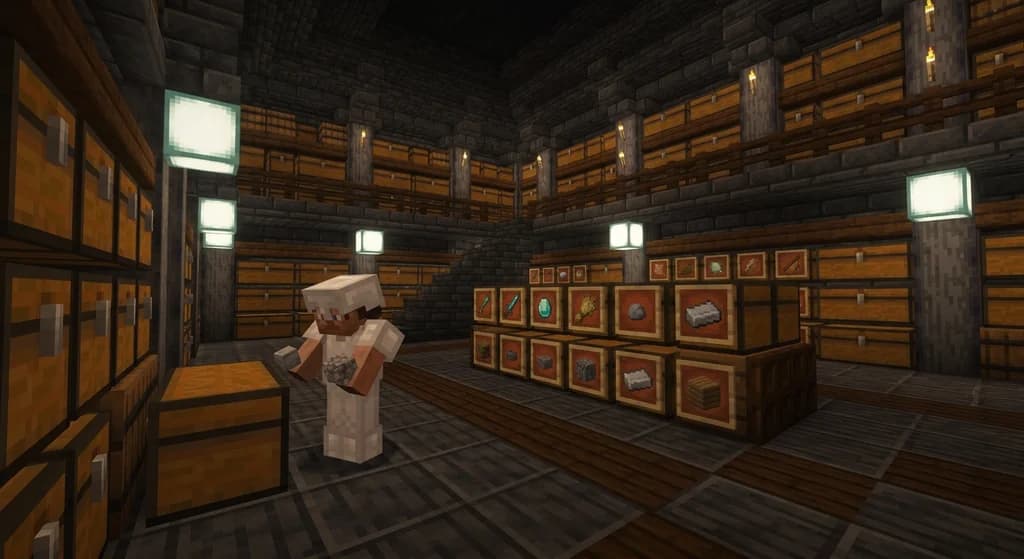
Key Takeaways
| Point | Details |
|---|---|
| Sort by category first | Group items into logical categories (building blocks, food, tools, valuables) before designing any chest layout. |
| Item frames are free labels | Placing an item frame with a sample item on each chest is the fastest visual indexing system in vanilla Minecraft. |
| Hotbar discipline wins fights | Assigning fixed hotbar slots to your sword, pickaxe, food, and blocks means muscle memory keeps you alive. |
| Barrels beat chests in tight spaces | A barrel holds 27 slots and opens even when a solid block sits directly on top of it, unlike a chest. |
| Separate raw from refined | Keeping raw ores away from ingots and crafted tools prevents accidental smelting mistakes and speeds up crafting sessions. |
| Clear inventory before every mining run | Dropping junk and stacking loose items before you descend means you never have to abort a mining session early. |
Table of Contents
- Why Minecraft Inventory Management Matters
- What Is a Minecraft Storage System?
- Top 7 Minecraft Organization Tips for 2026
- Best Storage Containers Compared
- How to Build a Simple Central Storage Room
- Tips for Managing Inventory on Long Quests
- How to Put This Into Practice on Gaia Legends
- Conclusion
- Frequently Asked Questions
- Recommended
A full inventory at the worst possible moment — that's a Minecraft rite of passage. You're deep underground, you've just cracked open a vein of ancient debris, and your inventory is packed with gravel, cobblestone, and three different types of wood you grabbed "just in case." You can't pick up a single ingot. Sound familiar? Good minecraft organization tips fix exactly this, and they're simpler than most players think.
This guide breaks down seven practical strategies that work in vanilla Minecraft and scale up to modded or SMP environments. Whether you're a solo survival player or grinding quests on a busy server, these habits will save you time, resources, and a lot of frustration.
Why Minecraft Inventory Management Matters
Poor inventory management isn't just annoying — it costs you real progress. Every time you scramble to find your sword mid-fight or accidentally smelt your iron ingots instead of your raw iron, you're losing time you could spend building, exploring, or trading.
Good organization also makes you a better teammate. On multiplayer servers, a player who knows exactly where their gear is reacts faster, shares resources more efficiently, and contributes more to group projects.
If you're still figuring out the fundamentals of surviving your first nights, check out How to Master Minecraft Survival: 12 Best Tips for Beginners 2026 before diving deep into storage systems.
What Is a Minecraft Storage System?
A Minecraft storage system is a structured arrangement of containers — chests, barrels, shulker boxes, or hoppers — organized so that every item has a designated location you can find in under five seconds. The best systems use visual labels, logical categories, and proximity to crafting stations to minimize the time you spend searching and maximize the time you spend playing.
Storage systems range from a single double-chest sorted by hand to fully automated hopper-and-sorter networks that funnel every dropped item to its correct chest automatically.
Note: You don't need a complex auto-sorter to be organized. A well-labeled manual system beats a half-finished automated one every time.
Top 7 Minecraft Organization Tips for 2026
Here are the seven habits that separate tidy players from players who spend ten minutes looking for their flint and steel.
1. Sort by Category, Not by Item
Don't give every individual item its own chest. Instead, group items into broad categories:
- Building blocks (stone, wood, concrete, terracotta)
- Raw materials (ores, raw metals, logs)
- Food and farming (crops, seeds, cooked meat)
- Tools and weapons
- Valuables (diamonds, gold, netherite, enchanted gear)
- Miscellaneous / junk (gravel, sand, dirt — items you use in bulk)
This way you always know which zone to check, even if you can't remember the exact chest.
2. Label Every Chest with an Item Frame
Item frames are crafted from one leather and eight sticks, making them essentially free. Place one on the front of each chest and insert a sample of what's inside. Your brain processes images faster than text, so a chest with a diamond displayed on it is found in half the time of a chest with a sign that says "DIAMONDS."
Pro Tip: Use a renamed item in the frame (press F3+H to see full item details) to add extra context — for example, a renamed frame item that says "Tier 1 Ores" vs. "Tier 2 Ores."
3. Lock Your Hotbar Layout
Your hotbar is the most valuable real estate in Minecraft. Assign fixed slots and never move them:
- Slot 1: Main weapon (sword or axe)
- Slot 2: Pickaxe
- Slot 3: Axe / shovel (swap as needed)
- Slot 4: Blocks for bridging
- Slot 5: Food
- Slots 6-9: Situational (torches, bow, water bucket, ender pearl)
Muscle memory built around a consistent layout means you grab the right item instinctively, even in a creeper ambush.
4. Use Barrels for Overflow and Tight Spaces
Barrels are often overlooked, but they have a critical advantage: a barrel can be opened even with a solid block placed directly on top of it, unlike a chest, which requires a clear space above. This makes barrels ideal for compact storage rooms, underground vaults, and wall-mounted shelving designs.
Both chests and barrels hold 27 slots in single form and 54 in double form (chests only), so capacity is comparable. But barrels also don't require a matching neighbor to double — one barrel is always one barrel.
5. Separate Raw Materials from Finished Goods
This single habit prevents the most common crafting mistake in Minecraft: accidentally using refined materials when you meant to grab raw ones, or vice versa. Keep a dedicated section for:
- Raw ores and logs (waiting to be processed)
- Ingots, planks, and other refined materials (ready to craft)
- Finished crafted items (tools, armor, blocks)
When your smelting area is adjacent to your raw materials chest and your ingot chest is right next to your crafting table, your workflow becomes automatic.
6. Clear Your Inventory Before Every Mining Run
Before you go underground, spend two minutes doing a full inventory reset:
- Return all building materials to storage.
- Stack and consolidate loose items.
- Fill food slots completely.
- Bring only the tools you need.
- Leave two or three open slots for unexpected finds (geodes, suspicious gravel, etc.).
Warning: Heading into a mining session with a cluttered inventory almost guarantees you'll have to abort early or leave valuable drops behind. A two-minute reset saves a twenty-minute retrieval trip.
7. Build Your Storage Room Near Your Base Entrance
Location matters as much as layout. A storage room buried deep inside your base means more walking time every trip. Place your main storage room within five to ten blocks of your base entrance, ideally between the door and your crafting area. This creates a natural flow: enter → deposit loot → craft → exit.
For inspiration on how to design the actual space, Unique Minecraft build ideas to inspire your next world has some excellent compact base layouts that integrate storage beautifully.
Best Storage Containers Compared
| Container | Capacity | Key Advantage | Best Use Case |
|---|---|---|---|
| Chest (single) | 27 slots | Cheap, widely available | General category storage |
| Chest (double) | 54 slots | Maximum vanilla capacity | Bulk materials like stone or wood |
| Barrel | 27 slots | Opens with block on top | Compact rooms, wall shelves |
| Shulker Box | 27 slots | Portable, keeps items when broken | Travel, quest loot, mobile kits |
| Ender Chest | 27 slots (personal) | Accessible from anywhere | Valuables, cross-location access |
According to the Minecraft Wiki, a double chest is formed by placing two single chests next to each other and holds 54 inventory slots — the largest fixed storage option in vanilla survival without mods.
Pro Tip: Always keep a shulker box in your ender chest. That way, even if you die, your most important portable storage is never truly lost.
How to Build a Simple Central Storage Room
You don't need a massive build to get organized. Here's a quick layout that works at any stage of the game:
The 5-Step Starter Storage Room
- Dig or build a 7×5 room adjacent to your main entrance.
- Line three walls with double chests — one wall per category group (building, materials, food/misc).
- Place your crafting table and furnaces on the fourth wall, directly across from your raw materials chests.
- Add item frames to every chest immediately — don't wait until later.
- Light it well with sea lanterns or shroomlights to prevent mob spawns inside.
That's it. Fifteen minutes of setup, and you have a system that scales with you for the rest of your playthrough.
As you grow and your needs expand — especially if you're playing on a server with an economy — understanding How SMP mechanics transform your Minecraft world will help you think about storage in the context of trading, shared bases, and community resources.
Tips for Managing Inventory on Long Quests
RPG-style servers and long exploration runs create a unique inventory challenge: you accumulate custom loot, quest items, and rare drops faster than you can sort them. Here's how to handle it:
Use Shulker Boxes as Mobile Kits
Pack a shulker box for each type of activity before you leave base:
- Combat kit: potions, arrows, backup sword, golden apples
- Building kit: scaffolding, blocks, torches, a bucket
- Quest kit: quest-specific items, maps, keys, consumables
When one box is full, you know that activity's resources are maxed out. No more guessing.
Set a "Junk Threshold"
Decide before you leave which items are worth picking up and which aren't. Common junk on long runs includes rotten flesh, gravel, andesite, and diorite. Dropping these on-site rather than hauling them home keeps your inventory clean for the items that actually matter.
Staying organized also pays off when you're enchanting high-value gear. A clean inventory means you can quickly identify what needs enchanting and what's already done — see Best Minecraft Enchanting Table Setup for Max Levels (2026) for how to set up your enchanting area right next to your storage system.
And as Minecraft itself evolves, new items and mechanics will keep adding to your inventory load — How Minecraft updates in 2026 will transform your gameplay covers what's coming and how to prepare your storage systems for new content.
How to Put This Into Practice on Gaia Legends
Gaia Legends is an RPG-focused Minecraft SMP where players complete quests, collect custom loot, and build up their bases over time. Every tip in this guide becomes even more important when your inventory fills with custom weapons, rare crafting components, and quest tokens that you genuinely cannot afford to lose.
On Gaia Legends, the custom loot system means you'll regularly pick up items that don't stack with vanilla equivalents — so dedicated shulker box kits and a well-labeled storage room aren't optional luxuries, they're survival necessities. The server's RPG quest structure also means long away-from-base sessions are common, making the "clear inventory before you leave" habit especially valuable.
Three specific Gaia features that reward good organization:
- Custom item drops from boss encounters that need their own dedicated storage section
- Player economy and trading where knowing exactly what you have speeds up deals
- Cross-biome questing where portable shulker kits let you stay in the field longer
Gaia Legends is free to join, non-pay-to-win, and supports Java + Bedrock crossplay. Join at gaialegends.pro and start your legend today.
Conclusion
Getting your Minecraft inventory under control isn't complicated — it just takes a few intentional habits applied consistently. The three most impactful changes you can make right now:
- Label every chest with an item frame so you find things in seconds, not minutes.
- Lock your hotbar layout and never deviate from it — muscle memory is your best survival tool.
- Clear your inventory before every mining run so you never have to abort a session early.
Try even one of these tips on your next play session and you'll feel the difference immediately. Organized players explore further, craft faster, and die less. That's the whole game.
Frequently Asked Questions
What are the best Minecraft organization tips for beginners?
The best Minecraft organization tips for beginners are: sort chests by broad category (building blocks, food, tools, valuables), label every chest with an item frame, and lock your hotbar to fixed slots for your weapon, pickaxe, and food. These three habits alone eliminate most inventory chaos and take under an hour to set up in any survival world.
How many chests do I need for a good Minecraft storage system?
Most mid-game players need between 8 and 16 double chests to cover all major categories comfortably. Start with 6 double chests (one per category group) and expand as your resource collection grows. It's better to have slightly too many chests than to cram unrelated items together and lose track of everything.
What is the best container for Minecraft inventory management?
For home base storage, double chests offer the most capacity at 54 slots. For compact rooms or wall-mounted designs, barrels are superior because they open with a block placed directly on top. For travel and questing, shulker boxes are unmatched — they retain their contents when broken, making them the safest way to carry organized gear on long trips.
How do I stop losing items in Minecraft?
The most reliable way to stop losing items is to use an ender chest for your most valuable gear. Ender chests are personal and accessible from any ender chest in the world, so even if you die far from home, your valuables are safe. Combine this with a shulker box inside the ender chest for a portable emergency kit.
Should I build an auto-sorter in Minecraft?
Auto-sorters using hoppers and comparators are powerful but complex. For most players, a well-organized manual system with item frame labels is faster to build and easier to maintain. Build a manual system first, learn what categories you actually need, and only invest in automation once you're confident about your layout and have the resources to spare.
How do I manage inventory on Minecraft SMP servers?
On SMP servers, inventory management gets more complex because you're dealing with player trading, shared storage, and custom items. Use shulker boxes as personal portable kits so your items don't get mixed with communal storage. Keep a dedicated "trade goods" chest near your base entrance for items you plan to sell or exchange, and always label personal chests clearly to avoid confusion with shared resources.
Recommended
- How to Find Non-Toxic Minecraft Communities to Join in 2026
- How to Build the Most Efficient Minecraft Trading Hall in 2026
- 7 Best Castle Minecraft Build Palettes for Epic Fortresses 2026
- Best Minecraft Modpacks for a Vanilla-Plus Experience in 2026
Ready to play? Join Gaia Legends today — no pay-to-win, Java + Bedrock crossplay.
- Java:
join.gaialegends.pro - Bedrock:
join.gaialegends.pro— Port19132
Frequently Asked Questions
What are the best Minecraft organization tips for beginners?
The best Minecraft organization tips for beginners are: sort chests by broad category (building blocks, food, tools, valuables), label every chest with an item frame, and lock your hotbar to fixed slots for your weapon, pickaxe, and food. These three habits alone eliminate most inventory chaos and take under an hour to set up in any survival world.
How many chests do I need for a good Minecraft storage system?
Most mid-game players need between 8 and 16 double chests to cover all major categories comfortably. Start with 6 double chests (one per category group) and expand as your resource collection grows. It's better to have slightly too many chests than to cram unrelated items together and lose track of everything.
What is the best container for Minecraft inventory management?
For home base storage, double chests offer the most capacity at 54 slots. For compact rooms or wall-mounted designs, barrels are superior because they open with a block placed directly on top. For travel and questing, shulker boxes are unmatched — they retain their contents when broken, making them the safest way to carry organized gear on long trips.
How do I stop losing items in Minecraft?
The most reliable way to stop losing items is to use an ender chest for your most valuable gear. Ender chests are personal and accessible from any ender chest in the world, so even if you die far from home, your valuables are safe. Combine this with a shulker box inside the ender chest for a portable emergency kit that's always recoverable.
Should I build an auto-sorter in Minecraft?
Auto-sorters using hoppers and comparators are powerful but complex. For most players, a well-organized manual system with item frame labels is faster to build and easier to maintain. Build a manual system first, learn what categories you actually need, and only invest in automation once you're confident about your layout and have the resources to spare.
How do I manage inventory on Minecraft SMP servers?
On SMP servers, use shulker boxes as personal portable kits so your items don't mix with communal storage. Keep a dedicated trade goods chest near your base entrance for items you plan to sell or exchange, and always label personal chests clearly to avoid confusion with shared resources. A clean personal inventory also makes you a faster, more reliable teammate.
Related guides
How to Brew Potions in Minecraft: Complete Beginner's Guide
Learn how to brew potions in Minecraft with this complete beginner's guide. Covers brewing stand setup, ingredients, recipes, splash and lingering potions.
How to Use Beacons in Minecraft: Complete Beacon Guide 2026
Learn how to use a beacon in Minecraft with our 2026 guide. Covers crafting, building, effects, activation, pyramids, and tips. Includes interactive range...
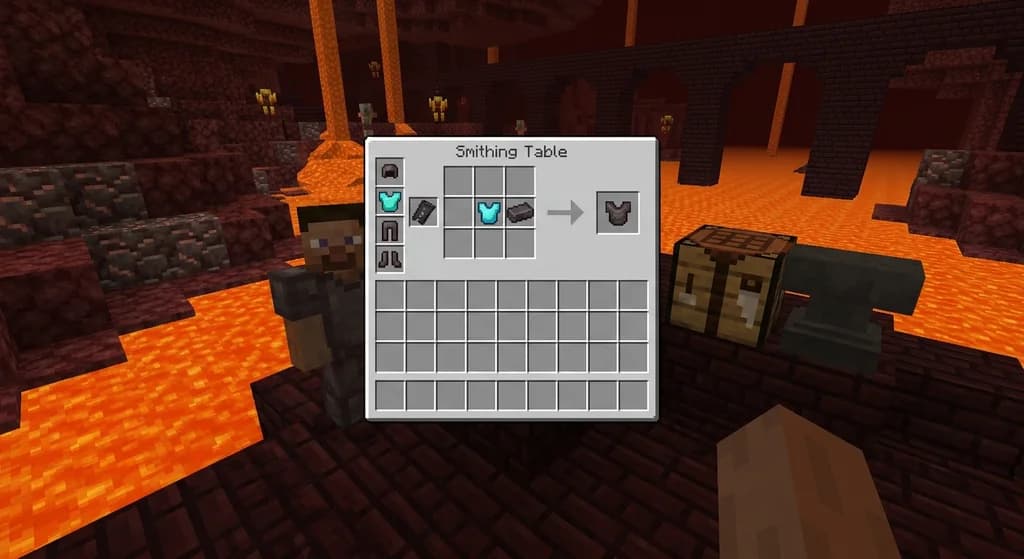
How to Use the Smithing Table to Upgrade to Netherite in 2026
Learn the Minecraft smithing table netherite upgrade process in 2026. Complete guide on using netherite upgrade templates, diamond gear, and ancient debris.
How to Use the Minecraft Recovery Compass in 2026: Full Guide
Learn how to use the Minecraft recovery compass to find your death location, craft it with echo shards, and never lose your items again. Full 2026 guide...
Have a question or another approach?
Compare notes with other readers. Include your edition and version when discussing mechanics.